
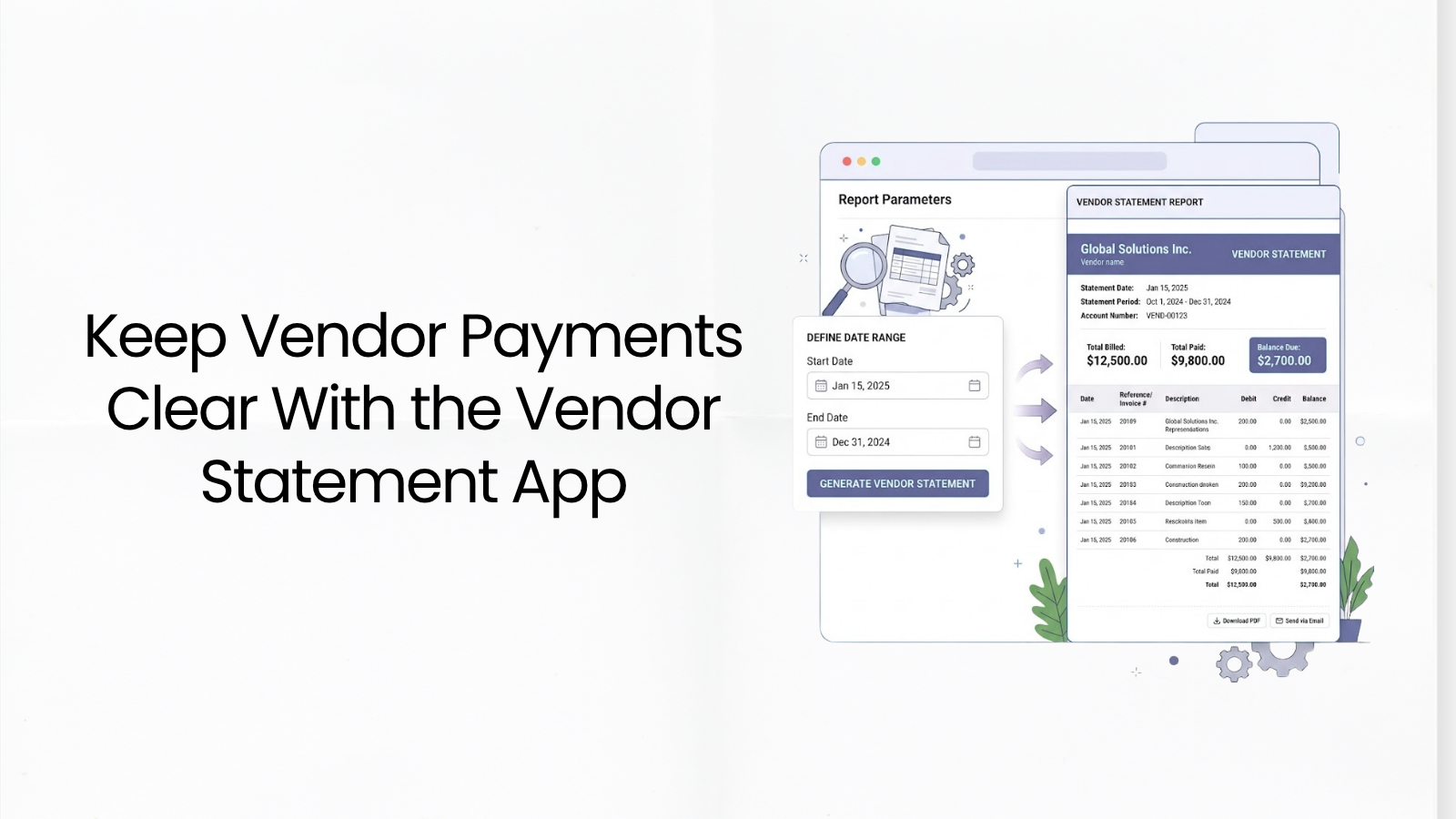
Keep Vendor Payments Clear With the Vendor Statement App
Reading Time: 3 minutesManaging vendor payments sounds simple until you have multiple bills, partial payments, changing balances, and suppliers asking, “Can you confirm what has been paid?”
That is where things can get messy.
A missed payment record, an unclear balance, or a long email thread can quickly turn a normal vendor relationship into an accounting headache. For small businesses, keeping vendors updated is not just about being organized. It helps maintain trust, avoid payment disputes, and keep the supply chain moving without unnecessary delays.
The Vendor Statement App in Akaunting lets you view all transactions between your business and a vendor in a single, clean report.
What Is a Vendor Statement?
A vendor statement is a financial summary that shows the transactions between your business and a supplier over a selected period.
It usually includes:
- – Opening balance
- – Bills received from the vendor
- – Payments made to the vendor
- – Transaction history
- – Closing balance
Think of it as a clean account record between your business and each vendor.
It helps answer simple but important questions like:
- – What do we owe this vendor?
- – Which bills have already been paid?
- – What payments were recorded during this period?
- – What is the closing balance after all activity?
For businesses that work with multiple suppliers, contractors, service providers, or wholesalers, this kind of visibility can save time and reduce confusion.
Why Vendor Statements Matter for Small Businesses
When a supplier sends goods, provides a service, or extends credit, they expect payment records to be accurate and easy to verify. If your records are scattered, it becomes harder to explain what has been paid and what is still outstanding.
This can lead to:
- – Payment disputes
- – Duplicate payment checks
- – Delayed supplier communication
- – Confusion around outstanding balances
- – Weak visibility over payables
- – Unnecessary back-and-forth with vendors
The Vendor Statement App gives you a quick view of each vendor’s account activity.
You can review bills, payments, and balances without jumping between different records. This is especially helpful when you need to check a vendor account before making a payment, responding to a supplier, or closing your monthly books.
Review Transaction History by Date Range
Not every payment question requires a full account history.
Sometimes, you only need to review transactions from a specific period, such as last month, last quarter, or the current financial year.
With the Vendor Statement App, you can select a date range and view vendor transactions within that period. This helps you monitor account activity more precisely and understand how balances changed over time.
For example, you can use it to check:
- – Bills received during a specific month
- – Payments made within a selected period
- – Outstanding balances after recent transactions
- – Vendor activity before month-end review
- – Payment history before approving a new bill
This gives your payable process more structure and control.
Reduce Back-and-Forth With Vendors
Vendor communication often becomes slow when both sides are checking different records.
A vendor may say a payment is missing. Your team may believe it was already recorded. Someone then has to search through bills, payment records, emails, and bank activity to confirm the situation.
Vendor statements help reduce this back-and-forth.
You can generate a statement, review the account activity, and share it with the vendor when needed. This gives both sides a common record to work from.
That means fewer “Can you check again?” emails and more confident payment conversations.
Print, Download, or Share Vendor Statements
Different situations require different ways of sending information.
Some vendors may prefer a PDF. Your internal team may need a printed copy for review. Others may need a quick link to access the statement.
The Vendor Statement App lets you:
- – Print vendor statements
- – Download statements
- – Share statement links
This makes it easier to keep vendors updated and provide account records in the format that works best for the situation.
Better Payables Visibility, Better Vendor Relationships
Vendor management is not only about paying bills.
It is about knowing what has been billed, what has been paid, what remains outstanding, and whether your records match the vendor’s expectations.
When this information is readily accessible, your business can make better payment decisions.
You can avoid paying too early when cash flow is tight. You can also avoid paying too late because a bill was missed. More importantly, you can maintain clearer, more professional relationships with the suppliers your business depends on.
Who Should Use the Vendor Statement App?
The Vendor Statement App is useful for businesses that regularly work with suppliers, service providers, contractors, wholesalers, or recurring vendors.
It is especially helpful for:
- – Small businesses managing multiple vendor accounts
- – Retailers working with suppliers
- – Service businesses paying contractors
- – Agencies managing external service providers
- – Businesses with recurring bills
- – Teams that need clearer payable records
- – Companies that want to reduce vendor payment disputes
If your business regularly asks, “How much do we owe this vendor?” then vendor statements can make your workflow much easier.
Try the Vendor Statement App today and keep every vendor account clear from bill to balance.