ChatGPT x Akaunting: AI Accounting Assistant for Small Businesses
Reading Time: 4 minutesManaging business finances often starts with a simple question.
Who owes me money? What expenses did I record? Where is my business spending the most? How is my cash flow looking?
For many small business owners, getting these answers often means opening accounting software, navigating between pages, filtering reports, and checking various records.
The Akaunting x ChatGPT app makes this easier.
It connects your Akaunting account to ChatGPT, so you can access supported accounting data through simple conversation. Instead of searching manually, you can ask ChatGPT to list records, create expenses, and show useful financial charts from your Akaunting account.
Akaunting remains your accounting software. ChatGPT becomes a faster way to ask questions and get answers from your business data.
What is the Akaunting x ChatGPT app?
The Akaunting x ChatGPT app is an AI accounting assistant for small businesses.
It helps you use ChatGPT to interact with your Akaunting data. You can ask for accounting records, review business activity, create expenses, and understand financial reports in a simpler way.
The Akaunting x ChatGPT app is useful for people who want faster access to their accounting information. It is built for: Small business owners, Freelancers, Founders, Consultants, Bookkeepers, Accountants, Service businesses, and Online businesses.
Anyone managing income, expenses, invoices, bills, and cash flow can use the app to get quick answers from Akaunting through ChatGPT.
What can you do with Akaunting in ChatGPT?
The app helps you perform common accounting actions through conversation. You can list invoices, customers, vendors, bills, transactions, and items. You can also create expenses and view financial charts.
Here is what that means in practice.
Create expenses
The app also allows you to create expenses directly from ChatGPT.
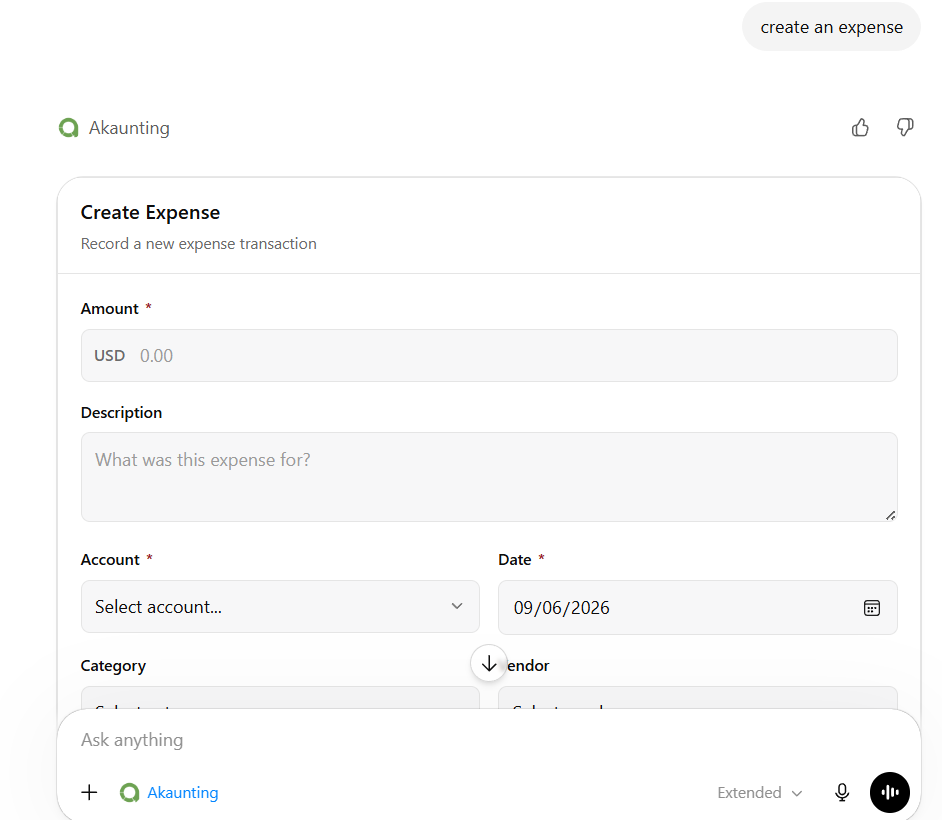
For example, you can record an expense by providing details such as amount, date, description, vendor, category, account, currency, and transaction number where needed.
Try asking:
“Create an expense for office supplies.”
This helps you record business costs faster and avoid missing important expenses.
Analyze business performance
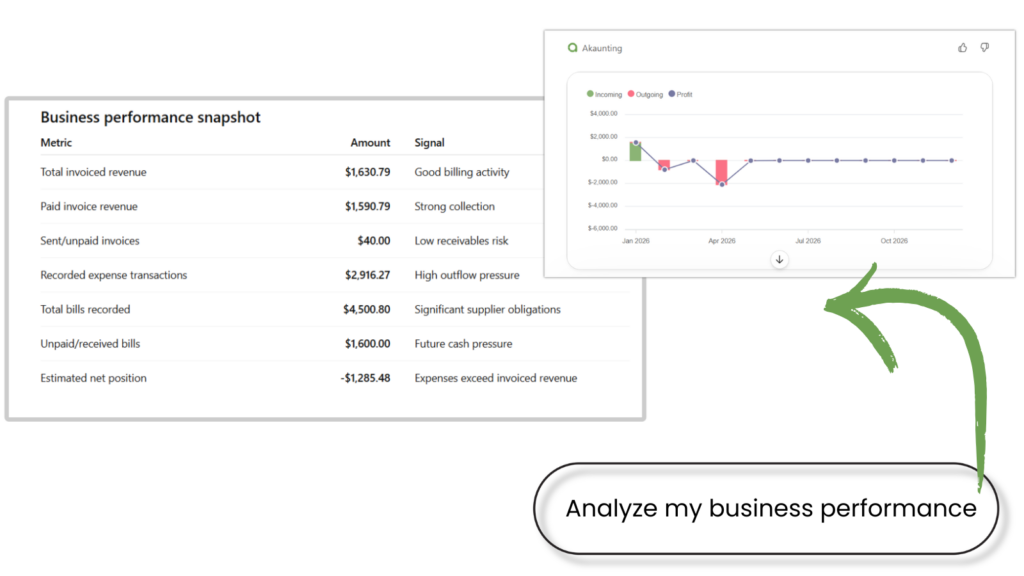
Ask ChatGPT to analyze your Akaunting data and summarize your business performance across invoices, bills, transactions, cash flow, profit and loss, and expenses by category.
Try asking: “Where is my business spending the most money?”
List invoices
You can ask ChatGPT to list invoices from your Akaunting account. This helps you quickly review billing activity, customer charges, and recorded sales without having to search your invoice page.
Try asking:
“List my invoices.”
This is useful for checking recent invoices, reviewing sales activity, or seeing what has been billed.
View expenses by category
Small businesses often spend money across different areas such as software, rent, travel, office supplies, marketing, operations, and supplier costs.
With the Akaunting x ChatGPT app, you can ask:
“Show my expenses by category chart.”
This helps you see where your money is going and identify spending patterns.
Other prompts
- – List transactions: Transactions show how money moves through your business.
- – View cash flow: Cash flow shows money coming into and going out of your business. This helps you understand how your business’s money is moving over time.
- – List customers: Ask ChatGPT to list the customers saved in your Akaunting account. This helps you quickly see who your business sells to and access customer records.
- – List vendors: This helps you check supplier records and see who your business buys from.
- – List bills: This helps you review supplier costs and business obligations more quickly.
- – List items: These are the products or services saved in your Akaunting account. You review products, services, sales, and purchase prices, categories, and item status.
- – View profit and loss: Profit and loss help you understand whether your business earns more than it spends. Ask ChatGPT to generate a profit-and-loss chart.
Does ChatGPT replace Akaunting?
No. The ChatGPT app gives you another way to access supported Akaunting data. It helps you ask questions, list records, create expenses, and view charts through conversation.
Think of it as a faster and more natural way to interact with your accounting information.
Connect Akaunting to ChatGPT
The Akaunting x ChatGPT app helps you get faster access to accounting data. You can list records, create expenses, and view financial charts without moving through multiple pages. You can ask simple questions and get closer to the answers inside your business data.
If you use Akaunting, connecting it to ChatGPT gives you a simpler way to manage everyday accounting tasks.
Frequently Asked Questions
What is the Akaunting x ChatGPT app?
The Akaunting x ChatGPT app connects your Akaunting account to ChatGPT, allowing you to access supported accounting records, create expenses, and view financial charts through conversation.
What can I do with the Akaunting x ChatGPT app?
You can list invoices, customers, vendors, bills, transactions, and items. You can also create expenses and view cash flow, profit and loss, and expense-by-category charts.
Is the app useful for small businesses?
Yes. It helps small businesses quickly access accounting information and understand business activity without manually searching through several pages.
Can I create expenses in ChatGPT?
Yes. You can create expenses by providing the needed details, such as amount, date, description, vendor, category, account, currency, and transaction number, where needed.
Can I view reports in ChatGPT?
Yes. You can ask ChatGPT to show your cash flow chart, profit and loss chart, and expenses by category chart using your Akaunting data.
Does ChatGPT replace Akaunting?
No. Akaunting remains your accounting software. The ChatGPT app lets you access supported accounting records and insights in a conversational way.
Do I need an Akaunting account?
Yes. You need an Akaunting account to connect your accounting data to ChatGPT.