
What are VAT Returns in Accounting?
Reading Time: 5 minutesVAT returns are one of those “simple on paper, annoying in practice” admin jobs.
A VAT return is the report that tells HMRC three things for a VAT period: how much VAT you charged (output VAT), how much VAT you paid (input VAT), and what you owe or can reclaim.
In 2026, the stakes are higher because VAT filing is built around Making Tax Digital (MTD) for most VAT-registered businesses. That means digital records and VAT returns filed through compatible software, not manual copy-and-paste.
In this post, you’ll learn:
- what a VAT return is in accounting terms
- what goes into it and how the numbers flow
- deadlines that actually matter
- how to stay compliant with MTD without making VAT your second job
What is VAT?
VAT (Value Added Tax) is a consumption tax that businesses charge on many goods and services. Businesses that register for VAT typically:
- – charge VAT on sales (output VAT)
- – pay VAT on business purchases (input VAT)
- – pay HMRC the difference, or reclaim the difference if input VAT is higher (subject to the rules)
In the UK, VAT registration becomes mandatory once your taxable turnover crosses the threshold (and some businesses register voluntarily). For 2026, the UK VAT registration threshold is £90,000, and the deregistration threshold is £88,000
What is a VAT return?
A VAT return is the periodic submission where you report your VAT position for a set period, usually:
- – VAT you charged customers (output VAT)
- – VAT you paid suppliers (input VAT)
- – net VAT due to HMRC or repayable to you
In normal UK VAT accounting, you submit returns quarterly, but some businesses file monthly or annually, depending on the scheme and setup. Your VAT online account is the source of truth for your filing schedule and deadlines.
How to file VAT returns
If you’re VAT registered in the UK, you must submit your VAT return using Making Tax Digital-compatible software. Paper filing is only for limited exceptions (like specific exemptions, cancelled registrations, or insolvency situations).
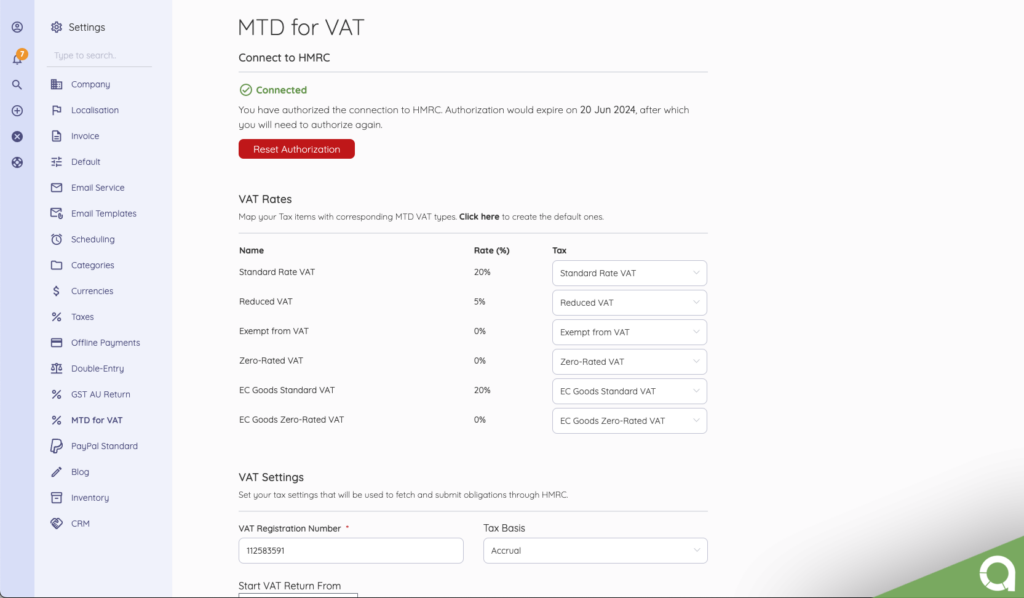
MTD for VAT requires VAT-registered businesses to:
- – keep VAT records digitally
- – file VAT returns using software that can connect to HMRC
Want VAT returns to feel automatic? Akaunting helps you track VAT on sales and purchases, keep records digitally, and submit them through an MTD-compatible workflow.
EU (quick context)
In the EU, VAT returns are a declaration submitted to the tax authority where you’re registered and generally include your taxable transactions, output VAT, input VAT, and net VAT payable or refundable
What information must a VAT return contain?
In the UK, VAT returns consist of nine boxes (Boxes 1 to 9). In plain terms, they cover:
- – VAT due on sales and other outputs (and certain acquisitions)
- – VAT due on acquisitions from other EU member states (relevant mainly to Northern Ireland for goods)
- – total VAT due
- – VAT reclaimed on purchases (input VAT)
- – net VAT to pay or reclaim
- – total value of sales (net)
- – total value of purchases (net)
- – total value of dispatches to EU member states (NI rules for goods)
- – total value of acquisitions from EU member states (NI rules for goods)
If you want the “official” box-by-box rules, HMRC explains exactly what goes into each box in VAT Notice 700/12.
How to calculate VAT returns
Whether you do it manually or through software, the logic is the same:
Net VAT position = Output VAT − Input VAT
- – If the number is positive, you owe HMRC.
- – If the number is negative, you usually have a VAT repayment due (subject to evidence and VAT rules).
Akaunting (and similar accounting tools) can calculate this automatically from your recorded sales and purchases, which is exactly why keeping clean VAT-coded transactions saves you headaches at filing time.
MTD reality check: if you are VAT registered, you usually need compatible software to keep digital records and submit VAT returns. If you want the fastest setup, Akaunting is built for that workflow.
VAT return deadlines in the UK
For most VAT-registered businesses, the deadline for submitting your VAT return online is usually one calendar month and 7 days after the end of your accounting period. That’s also usually the payment deadline.
Always confirm the actual due date inside your VAT online account, especially if you’re on an annual scheme or a non-standard period.
What happens if you file or pay late (the 2026 reality)
Late VAT returns and late VAT payments are treated separately.
Late submission
For VAT periods starting on or after 1 January 2023, HMRC uses a points-based late submission system. Once you hit the threshold for your filing frequency, you get a £200 penalty, and further late submissions can trigger additional penalties until you get back to compliance.
Late payment
For VAT periods starting on or after 1 January 2023, HMRC applies late payment penalties if VAT is not paid in full by the due date. The guidance is explicit that penalties can start once payment is more than 15 days overdue, with escalating consequences the longer it stays unpaid.
Tax Return vs. VAT Return
These get mixed up a lot.
A tax return (like Corporation Tax or Self Assessment) is driven by profit and income over a year.
A VAT return is driven by transactions in a period, specifically the VAT you charged and the VAT you paid. Even if your business is not profitable, you can still have VAT to pay (or reclaim) because VAT follows sales and purchases, not profit.
If you are still building your VAT basics, you might also want to read: How much is VAT in the UK?
What’s Next?
VAT returns aren’t complicated because the maths is hard; they become complicated when small details stack up. You need to consider what’s taxable versus exempt, what counts as evidence, which box a value belongs in, and whether your records are clean enough to support the numbers.
The good news is that once your workflow is solid, VAT becomes routine. Record sales and purchases properly, keep your VAT invoices organised, reconcile regularly, and submit on time. In most cases, your deadline is one calendar month plus 7 days after the VAT period ends, and MTD means filing through compatible software is the norm.
If you want VAT returns to feel less like a quarterly fire drill, use a system that keeps the VAT position up to date as you go. Akaunting helps you keep digital records, track output and input VAT, and submit using an MTD-compatible workflow, so you’re not building the return at the deadline.
Frequently Asked Questions (FAQs)
Where are VAT returns applicable?
VAT returns apply in countries that run a VAT system (or similar GST system). In the UK and across the EU, VAT-registered businesses must submit VAT returns following local rules.
Who must file VAT returns in the UK?
If you’re VAT registered, you must submit your VAT returns by the deadlines, and in most cases, you need to use MTD compatible software unless you qualify for an exception.
What are the VAT return deadlines?
In the UK, the deadline is usually one calendar month and 7 days after the VAT period ends.
How often are VAT returns submitted?
Common frequencies are quarterly, monthly, or annually, depending on the scheme. Your VAT online account confirms your specific schedule.