

How to Master Job Costing for Contractors and Trades (Without the Headache)
Reading Time: 7 minutesJob costing is the process of tracking every dollar spent on labor and materials for a specific project. Most contractors find tracking it difficult because workers may forget to record expenses or delay reporting them.
Small purchases often go missing if they aren’t linked to a specific task immediately. This delay means you only see the final totals after the work is finished, leaving no room to correct overspending as it happens.
The fix involves mastering the job costing for trades by building new habits in how you run each project. The challenge remains in doing it consistently enough for it to become part of how your business operates. These are the quick ways you can implement right away to make a job costing work, minus the headache.
Know the actual cost
An hourly wage is only part of what an employee actually costs you. On top of that, there’s payroll tax, workers’ comp, insurance, benefits, paid time off, and more, all part of the labor burden. For most contractors, this adds 30 to 40% to the base wage, and for union shops, it can run even higher.
As construction business coach Shawn Van Dyke puts it, if you’re only using hourly wages when estimating jobs and ignoring labor burden, you may be working harder on every project and still losing money.
The workaround requires —
Establishing a base rate
Contractors can calculate base rates using the bottom-up estimating method by totaling every dollar the business will spend to keep a worker on-site for one year and dividing that total by the hours the worker actually spends on billable tasks.
The total annual cost of employment will include all expenses tied to a specific worker over 12 months, including gross wages (state-unionized, but varies by expertise and experience), Mandatory Taxes (FICA, Medicare, etc.), Insurance (Workers’ Comp premiums based on trade risk), and more.
To put it in perspective, a carpenter earning $25/hour in base wages actually costs about $35/hour once you add roughly $4 in payroll taxes, $3 in workers’ comp, $2 in benefits, and $1 in equipment allocation.
Add a labor burden
Account for the payroll taxes, insurance, and benefits that sit on top of the hourly wage. This is the gap between what you pay and what the employee actually costs you. This burden varies by trade, where concrete contractors typically see 35–45%, MEP contractors run 45–55%, and roofers can hit 50–70% due to higher workers’ comp rates tied to fall risk.
Use a combination of both as your base rate
Calculate a new base rate based on both factors above for each estimate and production schedule.
If you pay a plumber $30/hour, your brain thinks a 40-hour week costs $1,200. In reality, the labor burden adds roughly $15/hour (50% of the total) before they even pick up a wrench.
Here’s how the budgeting works.
| Cost Category | Annual Calculation (Example) | Monthly Impact |
| Base Salary | $30/hr x 2,080 hrs | $5,200 |
| Mandatory Taxes | FICA, SUTA, FUTA (~9%) | +$468 |
| Workers’ Comp | Plumbing rate (~12% of payroll) | +$624 |
| Health & Benefits | $500/mo employer contribution | +$500 |
| PTO/Holidays | 3 weeks paid (no revenue generated) | +$300 (accrued) |
| Total Monthly Cost | The Actual Check You Write | $7,092 |
Account for the hidden bills
Hidden bills comprise small, daily expenses that don’t look like much on a single receipt but add up to thousands in lost margin over a year.
A service call often occurs without a formal invoice, and a quick run to the supply house is rarely billed to a specific task. These invisible costs are exactly what you must account for to master job costing in the trades, and verifying vendor or subcontractor details with a phone number lookup service helps ensure expenses are correctly attributed.
Some action items here:
- – Track change orders in your job folder: Use a digital folder or a physical binder for every project. Every time a client asks for something outside the original scope, update the project total immediately before the work begins.
- – Create cost codes for smaller expenses: Set up specific codes in your accounting system for items such as dump fees, fuel for extra runs, permit costs, and hardware costs. This makes it easy to see exactly how much these hidden items are costing you at the end of the month.
How do cost codes work?
For a deck builder, the lead carpenter may spend $210 at the hardware store. Without codes, that’s just a hardware expense.
With Akaunting, you can add custom fields that act as cost codes or build specific modules for cost tracking.
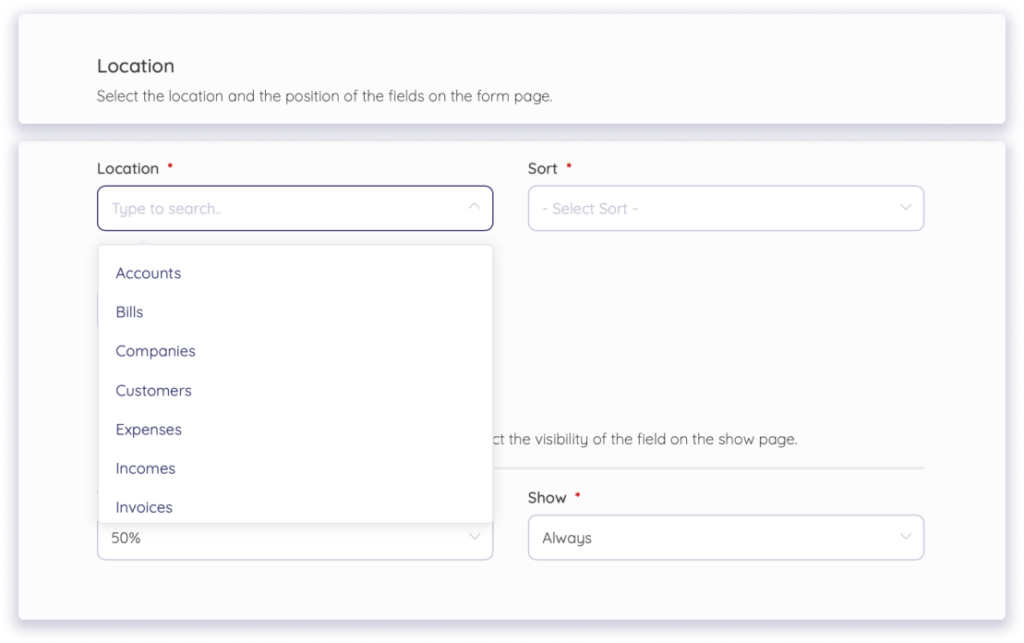
So, the cost code, in your accounting software, will show up as:
- – Code 05-100 (Deck Framing): $120 for joist hangers. (This was in your estimate)
- – Code 01-500 (Field Errands): $40 for the 45-minute drive because the hangers were forgotten. (This is a hidden bill.)
- – Code 02-200 (Site Clean-up): $50 for extra trash bags and a dump fee. (Cost attributed to slippage.)
Assign purchases for every project
Make sure to account for the purchase cost of the on-site work. A natural way most contractors work is to bulk-buy gear, apparel, and supplies once or twice a year and expense them as a single lump sum, which makes it impossible to know which projects are actually profitable.
Unfortunately, you’re never going to connect that cost to any specific project, which means two jobs with very different supply needs end up looking the same on paper.
How to make the most out of purchases to drive gains:
- Order what you need, per crew or per project
Instead of buying in bulk and hoping it evens out across jobs, make purchases per job or the crew. Using print-on-demand shirts for each crew or project can help you avoid excess inventory while still maintaining consistent branding tied to specific jobs.
Again, it’s a mindset shift: you step away from the stockpile mentality and buy specifically for a project, so the receipt is naturally linked to that job’s cost code, leaving no room for lost inventory.
- Customize merchandise for branding
An extension of ordering per crew and project is to have custom hats or t-shirts for branding through platforms like Printful and Printify, which offer print-on-demand fulfillment.
Use those to create your own merchandise style for each project, helping avoid inventory leftovers by tying them to each project rather than ordering a generic batch that sits in the shop.
- Run phase-wise purchase audits
Audit your spending at the end of each major project phase (e.g., after framing, before finishing) to pull actual material, gear, and transportation costs for that phase. Compare those costs to your estimate and apply a fix before the cost deviates significantly from the estimate.
The Armanino 2025 Construction Audit Guide confirms that periodic audits throughout the project lifecycle are superior to post-project reviews.
Use the project scoreboard
Details may fade once the project wraps up, with estimates ending up in a folder and receipts piling up. Also, you’ll lose out on the learnings from that job before the next one starts.
What can help is keeping a project scoreboard that provides a running view of current cost and estimated expenses. It’s also how you can learn where things stand against the original estimate.
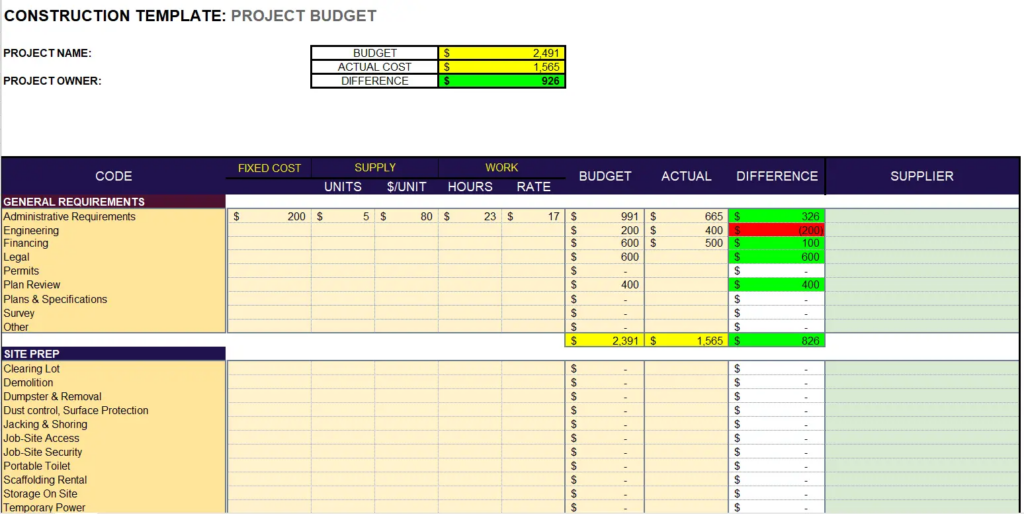
How to Use the Scoreboard (As seen in the template):
- – Spot the Red Immediately: In the example above, the Engineering line item is highlighted in red because the actual cost ($400) doubled the budget ($200). Seeing this difference mid-project allows you to investigate the cause before it repeats in the next phase.
- – Real-Time Variance Tracking: The green highlights show where you are winning against the budget, such as in Administrative Requirements. It gives a clear, consolidated view of your remaining margin (the $926 difference at the top).
Use Technology to Automate Your Profit Tracking
Manual spreadsheets are a starting point, but they often lead to data fatigue, with receipts missed and labor hours rounded off.
To scale your job costing for the current and next projects, move from manual entry to automated systems that link your estimates and inventory to project health in real time.
Using an integrated platform like Akaunting allows you to automate the heavy lifting of job costing.
To take this a step further, data integration platforms allow you to automatically sync data from your accounting tools, CRMs, and ad platforms into a single pipeline and analyze it using AI.
How to Automate the Workflow:
- Turn Estimates into Revenue: Use the Estimates App to create professional, customizable quotes.
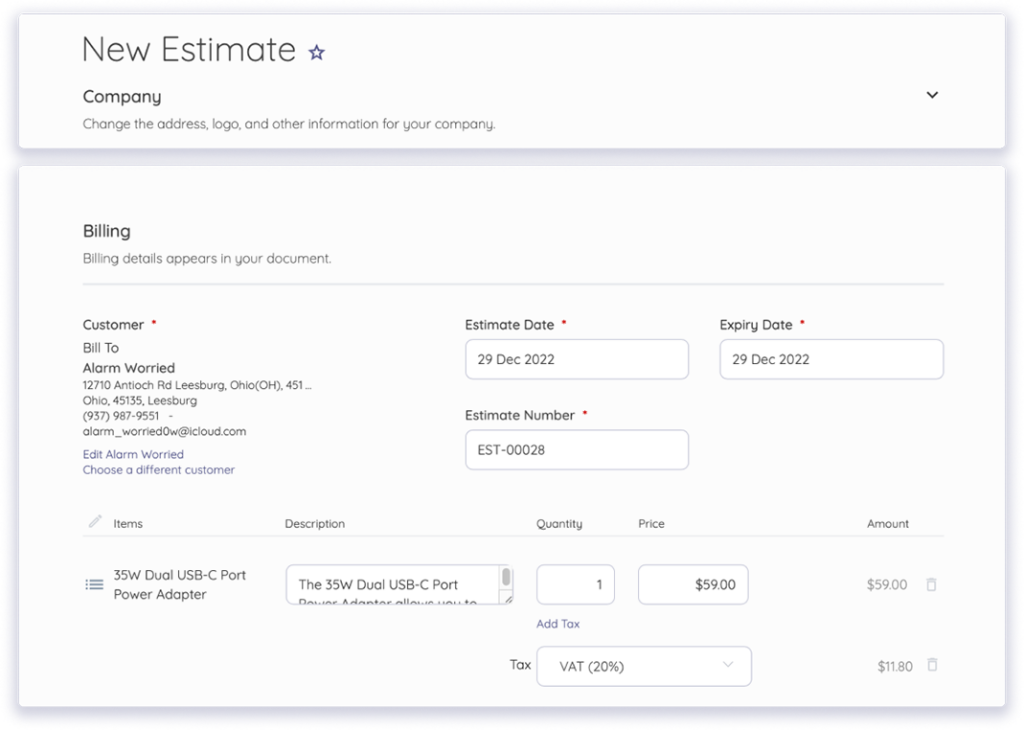
Add expiration dates to protect your margins against price uncertainty in materials.
- Track Inventory Confidently: With the Inventory App, you can automate tracking unlimited items, SKUs, and variants by color or category.
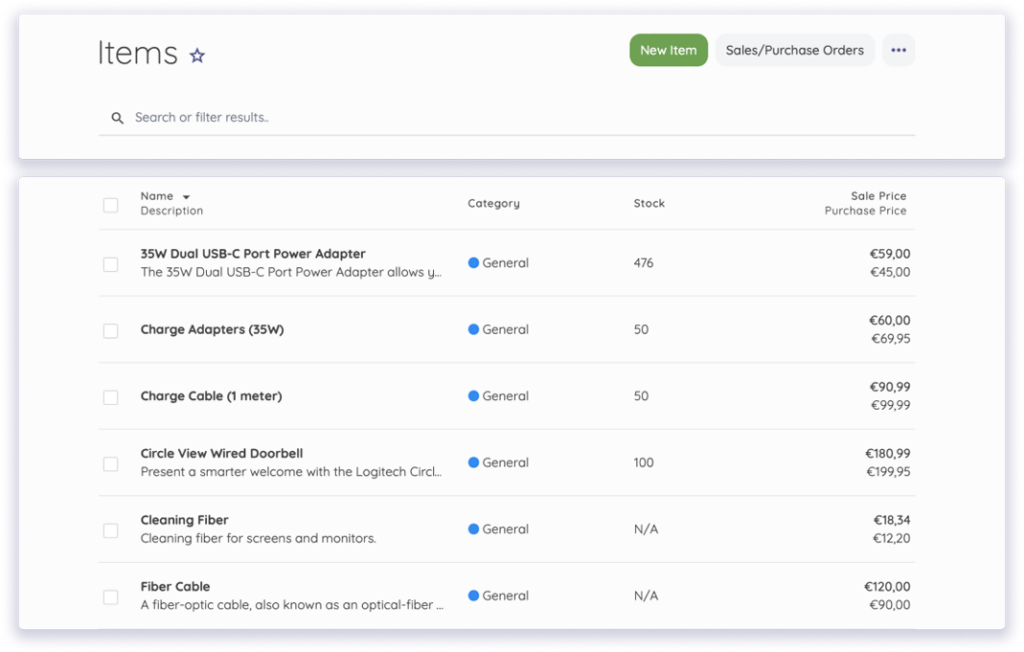
It keeps you informed with exactly what is in your warehouse versus what needs to be ordered to avoid an emergency supply run that burns $100 in hidden labor costs.
- Live Project Dashboards: The Projects App provides an at-a-glance overview by automatically connecting to the associated invoices and bills for each project.
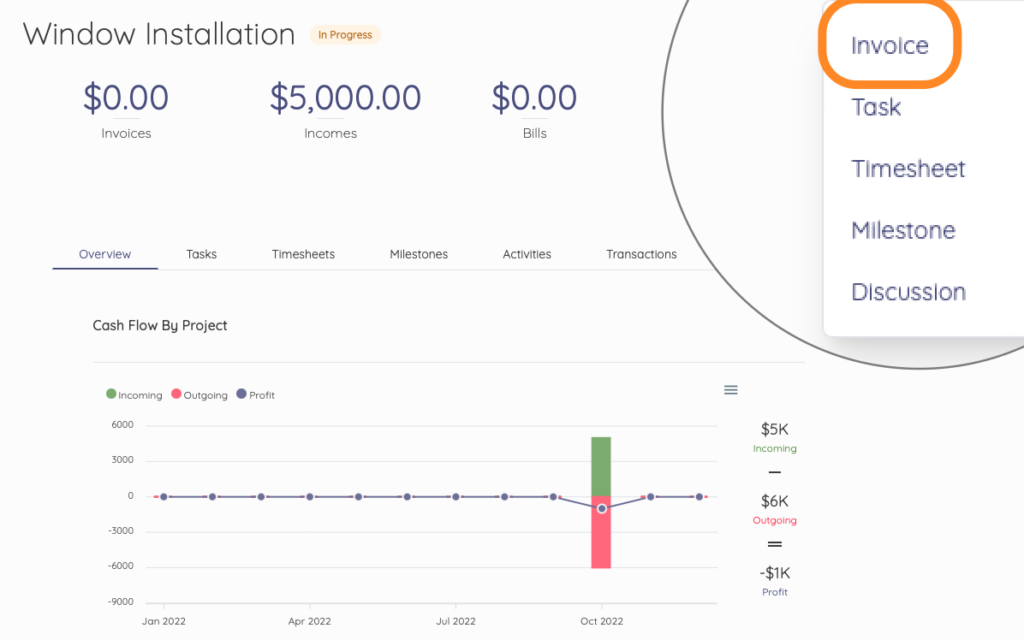
It provides a timeline of incoming and outgoing transactions in a chart. In practice, Akaunting spares you from manually calculating your phase-end audit and provides a summary of a project’s progress to help evaluate profitability instantly. Because timesheets are created automatically and linked to project tasks, you never miss a delivery deadline or a billable hour.
Conclusion
Job costing can be headache-free when done correctly with the right methods in place, as discussed above. Essentially, it starts with consistent action that forms a habit, whether that’s recalculating the labor burden this week or setting up cost codes for the small expenses you’ve been ignoring.
Start tracking every job with Akaunting and see your real project costs as they happen, not after it’s too late.
Author bio:

Rushali Das helps B2B SaaS companies grow organically through performance-led link-building strategies. By earning high-authority backlinks to relevant content assets, she improves search performance, drives qualified traffic, and supports MRR growth.