

Recurring Invoices and Expenses: A Basic Guide to Stop Forgetting Things
Reading Time: 6 minutesEver opened your bank statement and thought, wait, what is this charge for?
A friend who runs a small design studio went through that experience recently. Her accountant flagged a $40 subscription during tax prep, one she’d signed up for, used twice, and completely forgotten existed. She isn’t careless. She’s just busy, like every other small business owner trying to run client work, marketing, and finances at the same time.
That’s really the catch with recurring invoices and expenses. They don’t demand your attention the way a big one-time bill does, so they slip past quietly until something forces you to notice.
There’s no overnight fix for this, and I won’t pretend there is one. But you can build a setup where you’re not dependent on your own memory to catch it, and that’s what this guide walks you through.
What Counts as a Recurring Invoice or Expense?
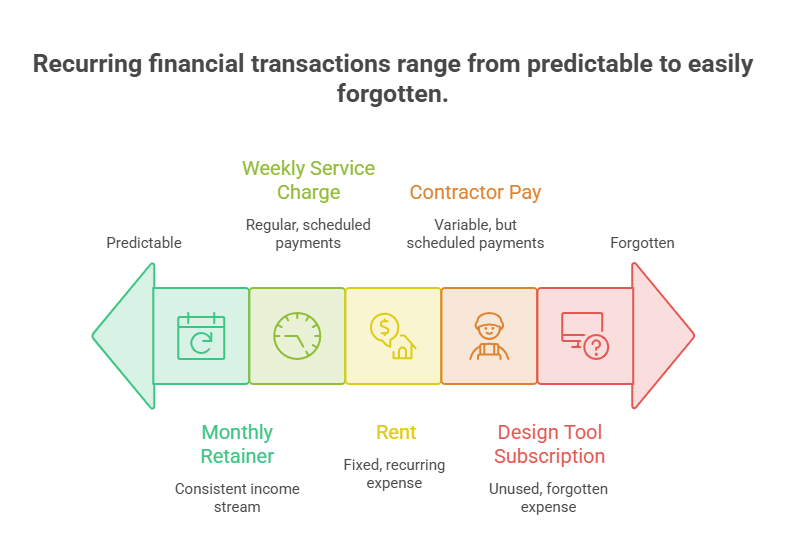
Recurring invoices are bills you send out on a schedule. Think of them as the predictable and repeated side of your income, the work you’ve already agreed to do, billed automatically at set intervals. Some businesses run entirely on them: agencies billing monthly retainers, consultants charging a fixed weekly rate, service providers who invoice every quarter without fail.
If you need a refresher on what an invoice actually is and what should go on one, that’s worth a quick read first. A monthly retainer for a client, a weekly service charge, whatever fits how you work.
Recurring expenses run the other direction. Rent, contractor pay, that one design tool you signed up for in March and might not even use anymore. The tricky part is that some of these feel essential right up until you check, and others have been quietly billing you long past their usefulness.
One client, one subscription? You’ll remember that without trying. Things start slipping once you’re juggling client number four or five, with a handful of tools running quietly in the background. At some point, something always falls through.
Why Even Organized People Forget This Stuff
It’s easy to chalk this up to being scatterbrained. But usually, that’s not what the real cause is. A handful of things tend to be going on at once:
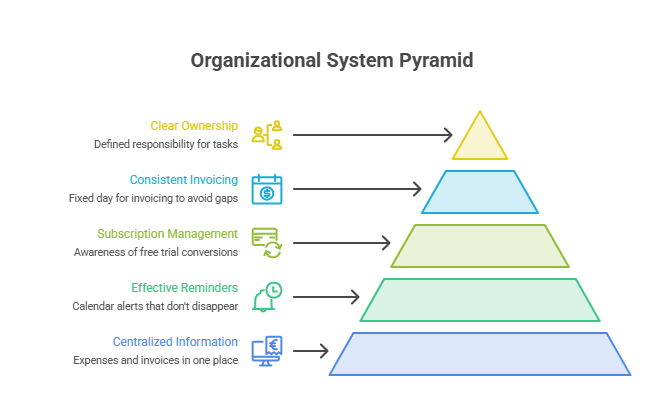
- – Nothing’s in one place. Expenses are kept in a banking app, invoices are kept in one inbox, and the two never communicate.
- – The noise drowns out reminders. In the middle of a meeting, a calendar alert appears, is dismissed, and never returns.
- – Free trials sneak up on you. They quietly convert to paid plans, and the first you hear of it is a charge on your statement. Forgotten subscriptions cost the average person $204 per year, according to a 2025 CNET survey, roughly $17/month in charges for services that go unused.
- – Invoicing happens “whenever.” Without a fixed day, gaps build up before anyone notices.
- – No one actually owns it. In small teams, especially, everyone assumes somebody else has it covered.
None of that makes you disorganized. It just means there’s no system for the repeat stuff yet, which describes most small businesses at some point.
What This Actually Costs You
A missed invoice once in a while doesn’t feel like much. But managing recurring invoices and expenses poorly is one of the bigger reasons small businesses run into cash flow trouble early on. On the flip side, forgotten subscriptions quietly eat your budget.
This overview of recurring expenses is worth bookmarking if you want a fuller list of what typically falls into this bucket.
A C+R Research study found that consumers’ monthly subscription spend averaged more than 2.5 times higher than what they estimated. Business owners aren’t immune to that, even though you’d think they’d be more careful.
Here’s roughly how a small slip can snowball:
| Mistake | What Happens Right Away | What It Costs You Later |
| Missed client invoice | Payment gets delayed | Cash flow gap, awkward follow-up |
| Forgotten software renewal | Surprise charge on the card | Money wasted on a tool nobody uses |
| Late vendor payment | Late fee or penalty | Strained relationship with a vendor |
| Duplicate invoice sent | Client gets confused | Looks unprofessional, slows future payments |
Almost everything in that table is avoidable, but not by trying harder. By having a setup that catches it before it ever becomes a problem.
A System That Doesn’t Depend on Your Memory
You don’t need an accounting background for any of this. Just somewhere to track things, a fixed rhythm for when invoices go out, and ideally something that does the remembering on your behalf.
Platforms such as ZenBusiness are built for exactly that, but even a spreadsheet beats relying on memory.
The same principle applies to other digital workflows: businesses that use AI-generated text for invoice notes, payment reminders, or client communications may also use an AI detector as part of their review process before sending anything externally.
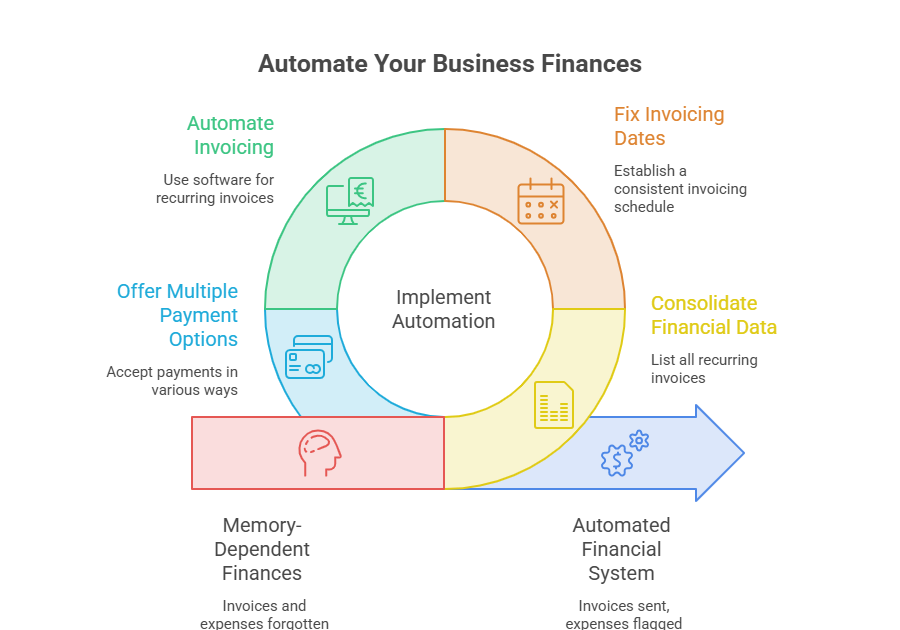
Keeping your recurring invoices and expenses organized comes down to four moving pieces:
1. Get everything onto one list
Pull up your last three months of bank statements and email, and write down every recurring invoice you send and every recurring expense you pay. Amount, frequency, due date, all of it. Most people are a little surprised once it’s all sitting in front of them.
2. Lock in fixed invoicing dates
Pick a date or two for invoicing and don’t move it around. First of the month, every other Friday, doesn’t matter which, as long as it’s fixed.
- – Clients respond well to that kind of predictability more than you’d expect.
- – A fixed schedule makes it obvious almost right away when something hasn’t gone out.
3. Let automation do the remembering
Automation is really the piece that solves this for good. Memory holds up fine until your business gets busy, and then it doesn’t hold up at all.
- – Most invoicing software can send recurring invoices on its own.
- – It can flag expenses before they chip away at your budget.
- – A comparison of the best tools for invoicing is worth browsing if you’re shopping around, since what works for a solo freelancer rarely fits a five-person team.
4. Make it just as easy to get paid
Getting paid quickly matters just as much as sending the invoice on time does. If a client still has to mail a check or sit through a slow bank transfer, you’ve given up most of what automation was supposed to buy you.
Giving people a few different ways for businesses to accept payments tends to shave off how long businesses wait to get paid.
A Few Words From Someone Who’s Seen This Up Close
Most accountants would say something similar if you asked them. Businesses don’t usually end up in cash flow trouble because the owner can’t do math. They end up there because nobody ever built a system, and memory was never going to hold once real money was riding on it.
Mistakes to Avoid
- – Mixing personal and business payments. Feels harmless at first, right up until tax season, when untangling it becomes a headache.
- – Setting a system up once and never looking at it again. Prices change, your needs change, so give the list a glance every quarter or so. Add AI to the flow, as LLMs are well-suited to analysis and recurring tasks.
- – Letting a canceled relationship coast on autopilot. When a client relationship wraps up, cancel that recurring invoice the same day instead of letting it run for another month.
- – Relying on reminders alone. Even with reminders switched on, get in the habit of opening your tracker once a week. Reminders by themselves aren’t really a system.
Key Takeaways
None of this requires a finance degree, just a bit of setup time.
- – Get every recurring item out of your head and onto one list.
- – Pick a fixed invoicing schedule and stick to it without exception.
- – Automate the sending and tracking wherever you reasonably can.
- – Make it easy for clients to pay fast, not just easy for you to send the invoice.
- – Check the whole setup every few months so it doesn’t drift out of date.
The Bottom Line: Stop Relying on Memory
Forgetting an invoice once isn’t a big deal, and it happens to nearly everyone eventually. The real problem shows up when it becomes a pattern, and by that point, it’s less about memory than the fact that there was never a system there in the first place.
Fixing it doesn’t take much. One honest audit, one fixed schedule, a bit of automation. Fixing it doesn’t take much. One honest audit, one fixed schedule, a bit of automation, and your recurring invoices and expenses stop being a source of stress and become something you barely think about anymore.
If you’ve been putting this off, don’t wait for another surprise charge or an awkward follow-up email to force the issue. Give it half an hour this week. Write down everything that repeats. Pick one thing from this guide and implement it. Your bank account will notice the difference before you do.
Ready to put this into practice? Tools like Akaunting make it easy to set up recurring invoices, track expenses, and stay on top of your books without the manual guesswork.
Author Bio:

Alex is a Content Marketing Specialist at Simplifiee.com with over 3 years of experience. She helps SaaS businesses drive organic growth through SEO and data-driven content marketing strategies. When she’s not experimenting with new strategies, you can find her traveling and exploring new places.