
How to Budget for Data Security when Utilizing Remote and Virtual Staff
Reading Time: 6 minutesRunning a distributed team brings freedom, flexibility, and access to great talent. It also raises one big question: how do you keep data secure without blowing through your budget? As more businesses shift to remote workers, the pressure grows.
Security tools seem endless, cybersecurity risks continue to evolve, and costs don’t take long to accumulate.
Remote teams often work on the go, which means unsecured networks become a real risk unless you plan for protections that travel with your staff.
Your first instinct might be to pile on more tools or complex policies. But the smarter move is to build a focused budget that protects data security for remote and virtual staff.
What Is Data Security for Remote and Virtual Staff?
Data security for distributed teams means protecting your information wherever work happens: home offices, coworking spaces, travel days, coffee shops, or anywhere an employee has remote access.
It covers data security policies and safeguards like device management, access controls, secure communication tools, threat monitoring, and safe file handling.
Why does it matter now?
– Remote work expanded attack surfaces for every business.
– Human error still drives the majority of data breaches.
– Security incidents hit small businesses the hardest, especially without a plan.
– Security budgets often grow unevenly because companies add tools as problems appear.
A focused cybersecurity budget helps you avoid surprise costs and strengthens your data protection from the ground up.
A good business budget also allows you to develop clear information security practices. This will guide your team toward safer decision-making and help reduce the risks that come with everyday remote work.
How to Budget for Data Security for Remote and Virtual Staff
Here’s where you put a workable plan in motion. Even one or two adjustments improve protection across your team.
1. Identify Your Security Risks and Needs
You can’t budget for risks you haven’t identified. Start with a simple audit of where you store your data, how staff access it, and the tools your team uses daily.
Break your remote work security needs into categories:
– Devices and hardware
– Secure access tools
– Cloud platforms and storage
– Password managers
– Endpoint protection platforms
– Staff training and awareness
– IT support and managed security services
Once you map these out, you’ll immediately see where your gaps and potential costs live.
As remote and virtual teams become the norm, data-security budgets must evolve beyond firewalls and VPNs.
By allocating part of your spend to adaptive security awareness training, leveraging platforms like Adaptive Security that customise learning to each user’s risk profile and AI-driven threats, you turn every team member into a conscious defender.
This human-centric investment reduces reliance on catch-up remediation, scales with workforce change, and anchors your budget around behaviour as much as technology.
Any remote desktop setup your team relies on also needs consistent monitoring, since remote access points often introduce additional vulnerabilities.
Another thing to consider is budgeting for regular awareness training. This lowers the odds of a phishing attack slipping through your remote workflows.
2. Cut What Doesn’t Add Protection
Security doesn’t mean collecting tools. It means using the right ones well. Not every platform deserves a spot in your budget.
Try a “CCR” method for streamlining:
C – Consolidate tools. If two platforms overlap, move to a single tool that covers both needs.
C – Cut unused licenses. Many small businesses make accounting mistakes, like paying for dormant seats and unnecessary add-ons.
R – Reevaluate vendors annually. Pricing changes yearly, and better options appear all the time.
This step alone can reduce your security spending while strengthening your setup.
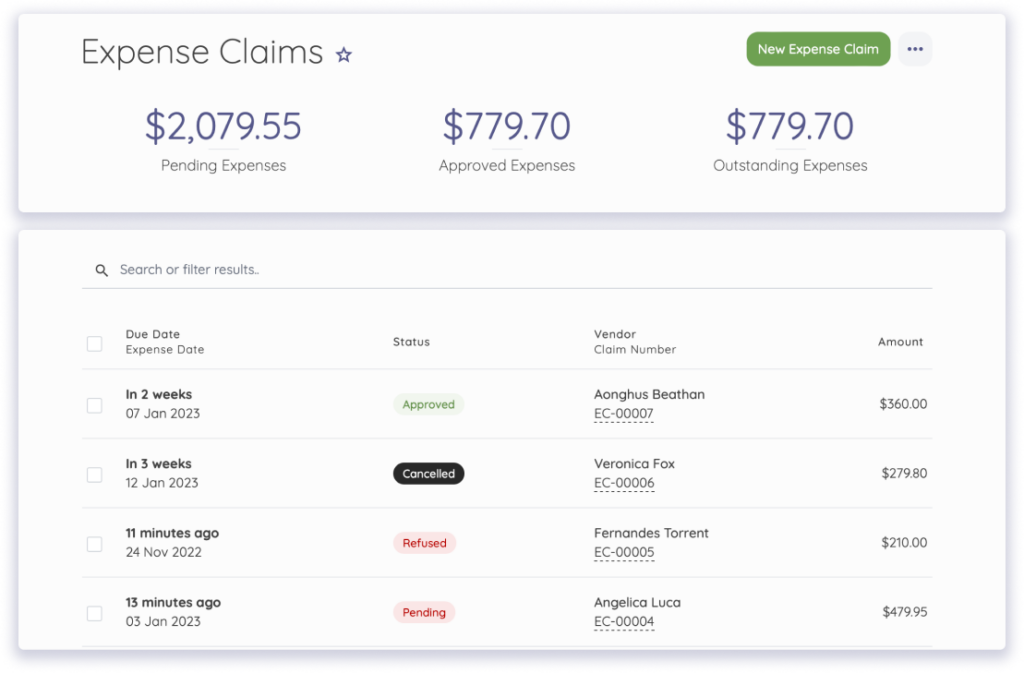
Accounting software makes this process even easier because it gives you a clear view of every tool your team pays for.
When all your security-related expenses appear in one place, you can spot subscriptions that renew in the background, seats you no longer use, or tools that overlap with others already in your stack.
Categorizing these expenses helps you compare what each platform costs versus how often your team relies on it.
You also get a clearer picture of any security-related expense claims submitted by remote staff. This prevents duplicate purchases of tools or unmanaged reimbursements slipping through your workflow.
3. Build a Simple, Scalable Security Stack
Complexity creates confusion, and confusion creates risk. Aim for a system your team can follow consistently.
Look for solutions that are:
– Easy for staff to adopt
– Cloud-based and scalable
– Straightforward to manage or monitor
– Affordable at the seat level
Standardizing your tools keeps your budget clean and ensures consistent protections across all remote employees.
Encryption tools strengthen your protection even further because encrypted files and messages remain secure even if a device is lost or accessed improperly.
4. Track Security Costs in Shorter Cycles
Thinking about security spending once a year isn’t enough for remote operations. Smaller review cycles keep your budget responsive.
Follow a quick two-step loop:
- 1. Track your security expenses on a monthly or quarterly basis.
- 2. Adjust your spending based on incident reports, staff needs, and new tool usage trends.
Repeat this cycle often, and your security budget becomes more accurate and much easier to manage.
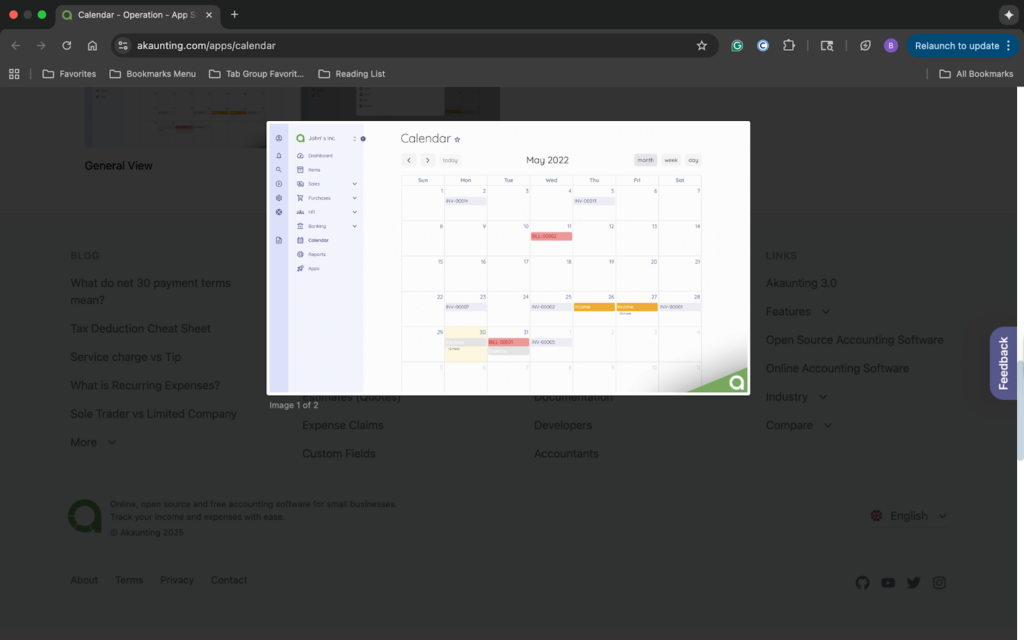
Want to make this process smoother? Accounting software helps pull everything together. You can categorize expenses, review trends, and check renewal dates without having to dig through scattered paperwork.
This provides visibility that helps you spot unusual spending patterns, unused licenses, or rising vendor costs early enough to adjust your plans before these numbers become a problem.
A tool with a calendar dashboard can show you all upcoming cybersecurity expenses in one place.
5. Build a Security Reserve Fund
Even the best plans need a safety net. Create a reserve for unexpected incidents or upgrades your team might need.
You can start small. Set aside savings from retired tools or reduced licensing and add a portion of revenue each month.
A reserve gives you breathing room if you need emergency support, new tools, or rapid response to emerging cyber threats.
When budgeting for data security, organizations must also consider the infrastructure supporting remote operations. Centralized visibility into servers, storage, and connected assets reduces the risk of misconfigurations and shadow IT.
Tools like Nlyte DCIM software help organizations track, secure, and optimize their data center environments, ensuring that remote and virtual staff rely on properly managed systems with minimized vulnerabilities.
Multi-factor authentication should also sit at the top of your priority list because it protects logins across remote devices and reduces the chance of unauthorized access.
6. Plan for Role-Based Access and Permission Controls
Access sprawl can create security gaps across remote teams. A structured permission system keeps sensitive information limited to the people who genuinely need it.
When planning your budget, consider access tools that are:
– Simple to assign and update
– Compatible with your existing platforms
– Designed to track permission changes
– Flexible enough to support team growth
A clear permission framework helps remote employees work efficiently while preventing unnecessary exposure of confidential information.
7. Account for Compliance and Documentation Requirements
Regulatory expectations don’t disappear when teams go remote. In many cases, they expand, creating a need for stronger documentation and consistent proof of secure practices.
Look for compliance-related needs such as:
– Tools that organize and store required documentation
– Periodic audit or review costs
– Automated reporting to reduce manual work
– Systems that maintain long-term record accuracy
A small investment in compliance tools creates confidence that your remote operations align with industry standards and legal obligations.
8. Strengthen Onboarding and Offboarding Processes
Every account you create or retire affects your overall security posture. Smooth onboarding and clean offboarding help control access and reduce hidden vulnerabilities.
Budget for processes and tools that support:
– Fast setup for new staff accounts
– Centralized identity and access management
– Secure handoff procedures
– Automated removal of inactive accounts
A consistent process for adding or removing users protects your systems and keeps your remote environment organized as your team evolves.
Your Next Step Toward Smarter Security
A secure remote team doesn’t require complicated systems or runaway costs. It requires a thoughtful budget, steady evaluation, and tools that deliver true value.
Audit your tools, tighten what you’re already paying for, and build a stack that supports the way your team works.
Want an easier way to organize your security expenses and keep your budget on track? Give Akaunting a try for free and see how straightforward budgeting can be.
Questions You Might Have
Will a tighter security budget weaken my protection?
Not if you set priorities wisely. You’re not cutting security. You’re just cutting waste. A focused budget targets your specific needs, which strengthens your defenses.
How much should I expect to invest?
It varies/ Some businesses reduce costs by consolidating tools. Other companies put their funds toward training or monitoring. Many save 10–20% simply by reorganizing.
Is security budgeting only for companies with big teams?
No. Even a small distributed organization benefits from a clear, predictable system for protecting data.
Author bio

Kelly Moser is the co-founder and editor at Home & Jet, a digital magazine for the modern era. She’s also the content manager at Login Lockdown, covering the latest trends in tech, business, and security. Kelly is an expert in freelance writing and content marketing for SaaS, Fintech, and e-commerce startups.