

Quarterly Tax Planning for Ecommerce Entrepreneurs
Reading Time: 8 minutesIt is common for ecommerce entrepreneurs to have sales coming from different regions and countries every quarter. This is also the reason why your tax position changes every time.
A yearly review cannot keep up; if you miss thresholds, the year-end filing turns into a last-minute rush.
Quarterly planning fixes that issue. You can run four small reviews instead of one big one, with a quarterly check, since it also covers more than just taxes.
It is when you:
- – Reserve cash for the bill
- – Clean up your books
- – Check your stock
This post covers each part so you can run the review on schedule.
Tips for Quarterly Tax Planning as an Ecommerce Entrepreneur
You owe tax in installments during the year, not in one payment when you file your return. In the US, you pay as you go. Missing a quarterly deadline can result in the IRS imposing an underpayment penalty, even if you pay in full later.
Sales tax and VAT have a registration threshold. This is the sales figure that forces you to register and start collecting tax in a place.
For example, $100,000 in a US state or £90,000 in the UK. The figure is measured on a rolling basis, usually your last 12 months of sales, so the total keeps moving as you sell.
That’s why a quarterly review is useful for your business as well to catch the threshold as you approach and make sure you register on time.
Reserve cash for tax as money comes in
Your tax bill grows with every sale. You only hand it over on a few fixed dates, in large amounts. A US quarterly estimated payment, or a VAT or sales tax remittance, is a single transfer covering months of sales at once.
This gap is where you can end up having challenges in making tax payments. If you spend the full payout each time money lands, then you will not have the cash ready when one of those big payments is due. It happens because the whole payout looks like income. Part of it is tax that you are only holding for the authority.
Instead, you could take the following steps:
- – Open a separate account and move a fixed percentage of every payout into it the moment the money hits your account. It leaves your spending balance before you can treat it as income.
- – Set that percentage from last year’s numbers. Take the tax you paid, divide it by your sales, then round up. If that comes to about 22%, hold back 25% as a buffer.
- – Check the balance each quarter and adjust the percentage if your margins change. Akaunting shows your current account balances on the dashboard, and its cash flow report breaks down money coming in and going out for any period, so you can see whether your reserves are keeping pace.
This keeps you out of the cash crunch that hits sellers after a strong quarter.
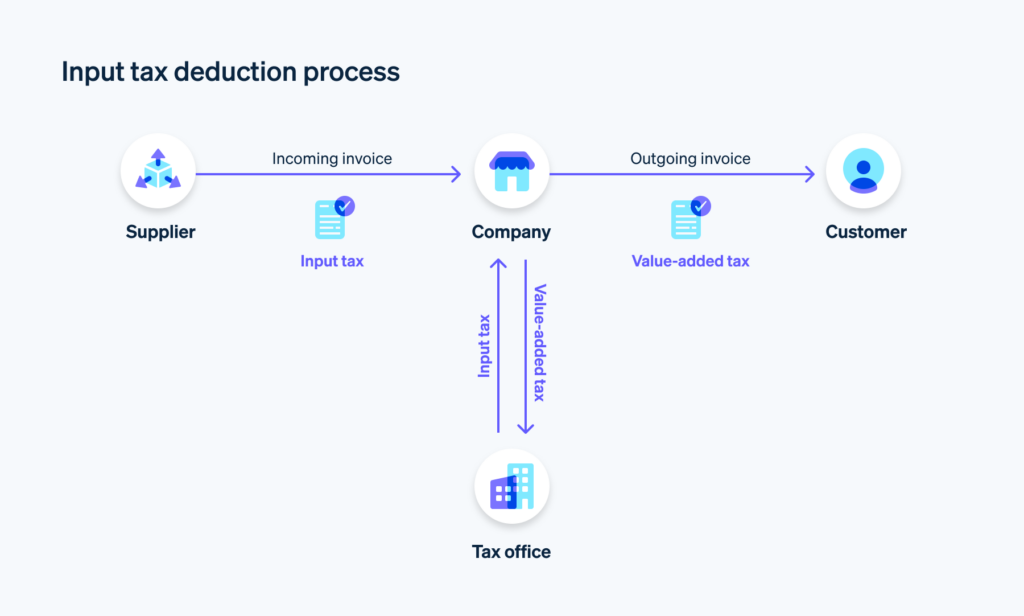
Map where you owe sales tax, VAT, and GST
Your tax liability varies by market. Some places tax you once you reach a sales threshold, while others tax you based on the number of orders.
As your business expands into multiple markets, keeping track of changing registration thresholds, compliance obligations, and filing requirements becomes more complex.
Many businesses use compliance management platforms such as Scrut to centralize regulatory obligations, monitor compliance tasks, and maintain audit-ready documentation alongside their tax processes.
Source: Stripe
A few require you to register for your first sale. What triggers the tax is the threshold. Cross it, and you must register and start collecting the tax for that region.
But if you are over that threshold without noticing, then the authority can bill you for taxes you never owed, plus interest.
You usually cannot recover that money from the customer.
Two things trip up ecommerce sellers in particular:
- – Storing stock in a country or a US state can create a tax obligation there on its own, with no minimum sales. Amazon FBA warehouses count.
- – Marketplaces often collect the tax for you. Some regions still count those sales toward your own threshold.
The table below shows where each main market sets its line.
| Region | You must register when | Watch for |
| United States | Your sales in a state pass $100,000 in the current or prior year (the common threshold). | Indiana, Wyoming, North Carolina, Alaska, Utah, Illinois, and New Jersey dropped the old 200-order trigger between 2024 and 2026. Stock held in a state creates an obligation by itself. |
| European Union | Your cross-border sales to EU consumers pass €10,000 in a year, added up across all EU countries. | Below €10,000, you charge your home VAT rate. Above it, you charge each customer at their country’s rate and file a single OSS return. Stock stored in another EU country requires local registration there. |
| United Kingdom | Your taxable turnover exceeds £90,000 over any rolling 12-month period. | The threshold rose from £85,000 to £90,000 on 1 April 2024. Sellers based outside the UK have no threshold and register from the first sale. |
| Canada | Your worldwide taxable revenue exceeds CA$30,000 in a single calendar quarter or across four consecutive quarters. | A single large sale can push you over the edge within one quarter. The $30,000 figure has not moved since 1991. |
Note: the EU is changing how the €10,000 figure is measured from January 2027. Make sure you re-check this if you sell there.
Each quarter, pull your sales by country and US state, then check each total against its threshold. Ensure registering before you cross, not after. If you regularly prepare pricing or project quotes, using an AI estimate generator can help you create consistent, professional estimates while keeping your financial records organized.
Track Deductible Expenses
Regularly reviewing expenses allows you to identify deductions and significantly reduce your overall tax burden.
- – Direct business expenses: Deduct costs for shipping, packaging, and fulfillment.
- – Marketing: Write off expenses for social media ads, digital advertising, and influencer partnerships.
- – Technology: Deduct costs for e-commerce platforms, web hosting, accounting software, and productivity tools.
- – Inventory adjustments: Account for unsold, lost, or damaged inventory
Count your stock and work out COGS
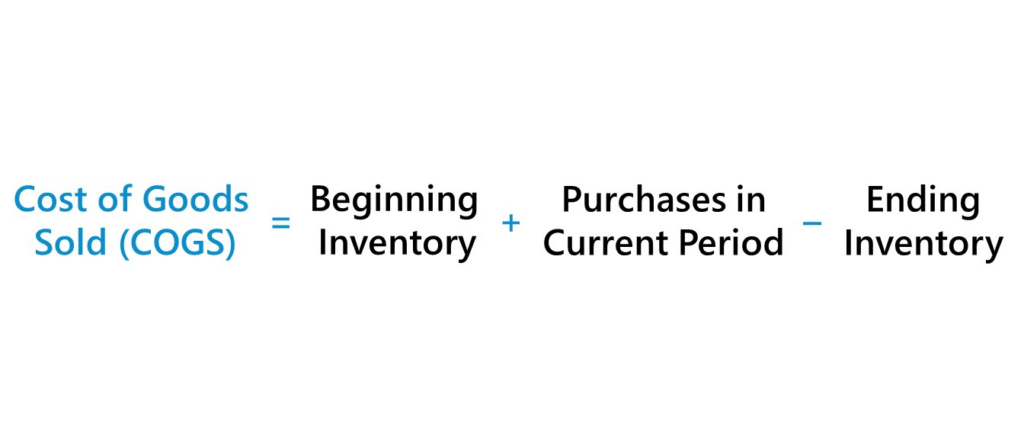
Inventory affects both your cash and your tax bill, so it needs a quarterly review. You deduct the cost of goods sold (COGS) for the period.
The unsold stock stays on your books as an asset. It is not a deduction yet.
Source: Wall Street Prep
Get the stock count wrong, and the error spreads:
- – An incorrect stock count results in incorrect COGS.
- – Wrong COGS gives the wrong taxable profit.
- – Wrong profit results in an incorrect tax payment.
Inventory also ties up cash, so the money sitting in unsold stock is money you cannot spend, even when revenue looks healthy.
Which essentially comes down to two jobs each quarter:
- – Counting the physical stock and matching it to your records. That’s when the shrinkage and miscounts show up early.
- – Value what is left and calculate COGS for the period.
A spreadsheet handles this, while you have only a handful of SKUs. As that number grows, the manual work tends to break down. You forget to log some sales, or you mistype a quantity during a busy week, and the sheet stops matching what is on the shelf.
A stock tool removes most of those manual steps. Each purchase you record adds to the stock count, and each sale you record subtracts from it, so the quantity stays correct on its own between your physical counts. Akaunting’s Inventory app works this way. It keeps your stock and COGS figures accurate without the need to set up a full warehouse system.
Pay estimated income tax on the right schedule
You also owe income tax on your profit. In the US, you pay it in four installments throughout the year.
The IRS safe harbor lets you avoid the underpayment penalty. Pay the smaller of these two:
- – 90% of this year’s tax, or
- – 100% of last year’s tax. This rises to 110% if your prior-year adjusted gross income (AGI) was over $150,000, or over $75,000 if you are married filing separately.
There is no penalty if you owe under $1,000 after withholding and credits. The prior-year route is easiest to plan because you already know the number.
Ecommerce sellers overpay when their sales are seasonal. The IRS sets the penalty quarter by quarter, and the default method assumes you earn the same amount each quarter. A seller who earns most of the profit in the Q4 holiday rush does not.
The annualized income installment method (Schedule AI) fixes that. You base each quarter’s payment on what you earned that quarter. You also pay less in the slow quarters and more after the busy ones.
“Ecommerce moves at the speed of global commerce, yet relying on an annual financial review forces entrepreneurs to navigate that velocity using a rearview mirror. True financial mastery requires shifting to a quarterly rhythm, where you stop treating tax as a retrospective penalty and start using it as a real-time diagnostic of your business’s health,” says Sam Meenasian, Operations Director of USA Business Insurance. “When you reconcile your cash, inventory, and obligations every ninety days, you don’t just survive the fiscal year—you build a scalable foundation rooted in absolute clarity rather than dangerous guesswork.”
Keep your books clean
Every step above needs accurate books. Many growing ecommerce businesses are also exploring AI services to automatically categorize expenses, detect bookkeeping anomalies, forecast tax liabilities, and prepare quarterly reports. Bad records give you a guessed profit figure, and every tax estimate built on that guess is a guess too.
Alongside accurate accounting, a finance crm can help teams organize customer inquiries, payment follow-ups, and financial documents in one place.
Each quarter:
- – Reconcile the bank account and each payment channel (Stripe, PayPal, marketplace payouts) against your recorded sales. When onboarding new suppliers or payment contacts, a quick people search tool can help verify identities before adding them to your records.
- – Categorize expenses as you go, so your deductions are ready at filing.
- – Record the full sale and the fee as separate lines, not just the smaller amount that landed. If you only book the deposit, your revenue will look too low, and you’ll miss out on deducting the fee.
You do not need accounting training for this. Akaunting records income and expenses and reconciles your accounts. It produces the profit and tax reports for your quarterly review, and the base software is open source. This is not to replace a specialist for a complex multi-country setup. But for a growing store, it gives you a clean base to work from.
Winding up: Your quarterly checklist
Run this at the close of each quarter:
- – Move your tax-reserve percentage into a separate account.
- – Pull sales by country and US state. Check each against its threshold.
- – Count and value inventory. Calculate COGS.
- – Reconcile every bank and payment account. Categorize expenses.
- – Recalculate the quarter’s profit. Make the estimated tax payment.
- – Flag any region where you are close to a threshold.
The first run is slow. After that, each review is a quick set of checks, and your year-end filing is just a summary of the work you already did.
If you want a tool to carry this, start small with Akaunting rather than setting everything up at once.
Create your account at akaunting.com, where the self-hosted version is free. Also, the cloud version skips the setup if you would rather not host it yourself.
About Author: