
Akaunting May 2026 Round Up: AI Accounting, User Growth, Invoicing Trends, and Top Apps
Reading Time: 7 minutesMay was an active month across the Akaunting community, with strong growth in several regions, increased use of core accounting features, and rising interest in apps that help businesses customize invoices, manage cash flow, and work more efficiently.
This month’s round-up looks at where Akaunting usage grew, which features users relied on most, and what these trends may tell us about how small businesses are managing their finances in 2026.
Akaunting x ChatGPT: Manage Accounting Tasks With AI
Akaunting users can now connect Akaunting to ChatGPT through the Akaunting x ChatGPT app.
This integration allows users to interact with their financial data using simple prompts. Instead of manually searching through transactions or reports, users can ask ChatGPT for financial insights, create expenses, and better understand business activity inside Akaunting.
For example, users can ask questions such as:
- — “What expenses increased this month?”
- — “Create an expense for this supplier payment.”
- — “Summarize my recent financial transactions.”
- — “Show me what changed in my business spending.”
For small business owners, freelancers, accountants, and finance teams, this makes accounting software easier to use by presenting financial information in a more conversational, accessible way.
May User Growth: Regions With the Strongest Momentum
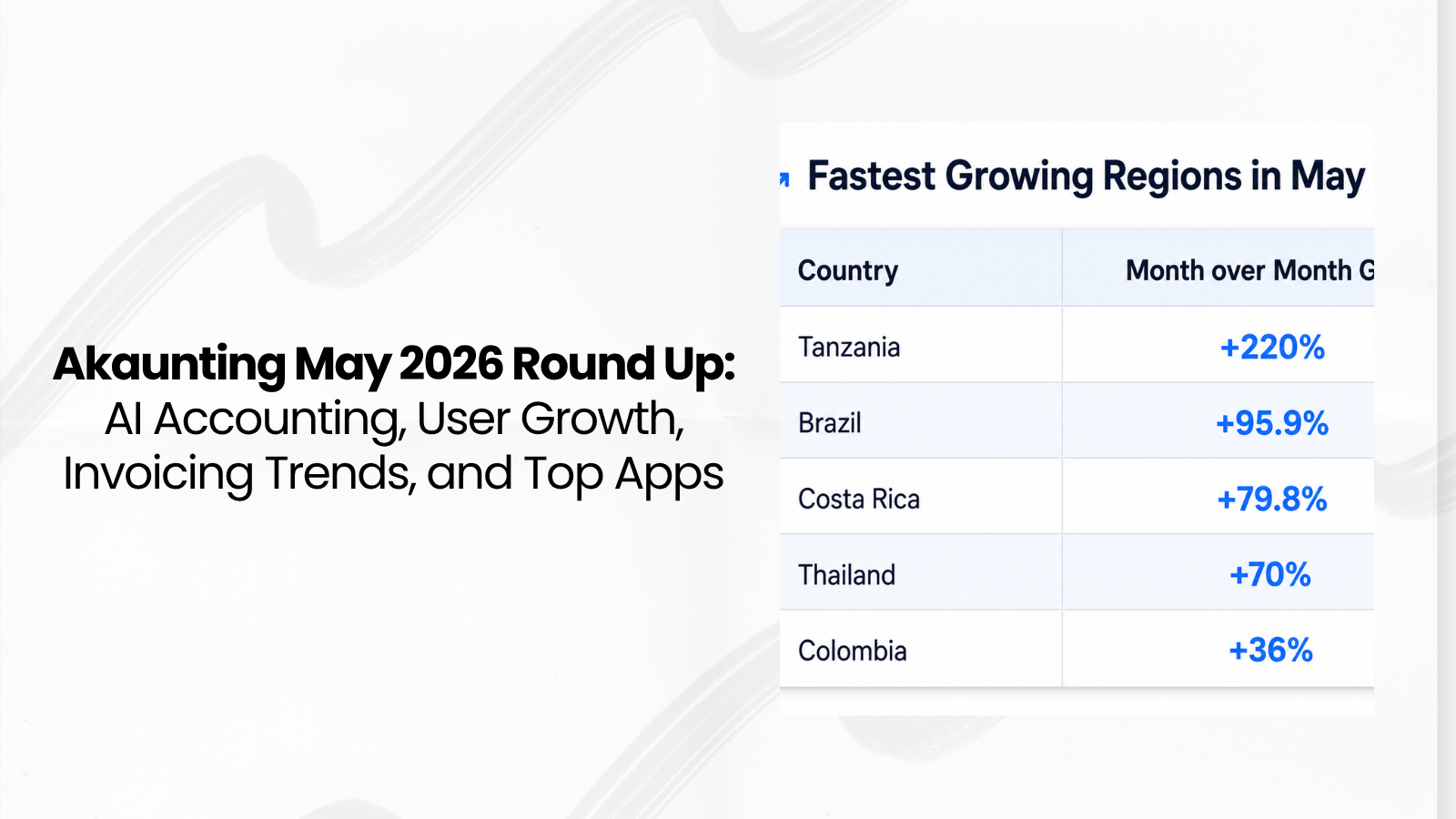
Akaunting saw strong month-over-month user growth in several countries in May 2026.
The top growth regions were:
| Country | Month over Month Growth |
| Tanzania | +220% |
| Brazil | +95.9% |
| Costa Rica | +79.8% |
| Thailand | +70% |
| Colombia | +36% |
There were also notable increases in user activity from the Philippines, Nigeria, and Greece.
These growth figures show where Akaunting usage increased the most compared to April 2026. A high growth rate does not always indicate that a country has the largest total user base. It means activity from that region grew faster month over month.
For example, Tanzania’s +220% growth suggests a sharp increase in Akaunting activity during May. This may be connected to more small businesses exploring online accounting software, a rise in new users, or increased use from existing businesses.
Brazil’s +95.9% growth is also important because it has a large small-business economy, where invoicing, expense tracking, and cloud accounting tools can help business owners manage their financial records more efficiently.
Most Used Features in May
In May, Akaunting users were especially active in features related to financial organization, recurring billing, employee records, reporting, and product education.
The most used features in May compared to April were:
| Feature | Growth | Popular Regions |
| Create Category | +119% | Philippines, Brazil |
| Create Recurring Invoice | +95% | Jamaica, Malaysia |
| Create Employee | +85% | Albania, Nigeria |
| Pinned Reports | +57% | Malaysia, United States |
| Watched Product Videos | +47.5% | Philippines, Indonesia |
These feature trends show how small businesses are using Akaunting to organize accounting records, automate invoicing, manage teams, and understand financial performance.
Create Category Grew by 119%
The Create Category feature increased by 119% in May, with strong usage in the Philippines and Brazil.
Categories are important in accounting because they help businesses organize income and expenses. A small business can use categories to separate rent, software subscriptions, travel costs, supplier payments, marketing expenses, sales income, and other financial activities.
This makes bookkeeping cleaner and financial reports easier to understand.
The growth in category creation suggests that more users are setting up structured accounting workflows inside Akaunting. It may also indicate that new users are customizing their accounts to align with how their businesses operate.
Recurring Invoice Creation Increased by 95%
Create Recurring Invoice increased by 95%, with strong activity in Jamaica and Malaysia.
This is a meaningful trend because recurring invoices are typically associated with businesses that use repeat billing models. These may include consultants, agencies, subscription businesses, service providers, maintenance companies, and freelancers with monthly retainers.
Instead of creating the same invoice every month, users can automate repeat invoicing. This helps reduce manual work, avoid missed billing dates, and improve cash flow consistency.
Employee creation signals a growing business structure
The Create Employee feature grew by 85%, with notable activity in Albania and Nigeria.
This suggests that more businesses are adding team members to their accounting workflows.
As businesses grow, they often need better ways to manage employee-related records, payroll workflows, permissions, and internal financial processes.
While this does not necessarily mean every user is hiring new staff, it does suggest that more Akaunting users are setting up their businesses in a more structured way.
Pinned reports show demand for faster financial visibility
Pinned Reports increased by 57% in May, especially in Malaysia and the United States.
Financial reports are valuable, but business owners often need fast access to the reports they check most often. Pinned Reports make it easier to keep important reports visible and accessible.
This growth suggests that Akaunting users are paying closer attention to financial visibility.
Instead of waiting until the end of the month to review numbers, users may be checking business performance more regularly. This can help with cash flow planning, expense control, revenue tracking, and decision-making.
Product videos are helping users learn faster
Product video views increased by 47.5% in May, driven by strong user engagement in the Philippines and Indonesia.
This shows that more users are learning how to use Akaunting through video content.
Product videos can help users understand accounting workflows faster, especially when setting up features such as invoices, expenses, reports, apps, integrations, or recurring transactions.
For SaaS accounting software, educational content matters because users often want quick answers to practical questions such as:
- — How do I create an invoice?
- — How do I track expenses?
- — How do I use reports?
- — How do I set up recurring invoices?
- — How do I connect an accounting app?
The rise in product video views suggests that Akaunting users are actively seeking guidance to get more value from the platform.
Biggest Drop in User Activity: View Invoice PDF
The largest decline in May was View Invoice PDF, which fell 80% from April.
This is an interesting change.
A drop in View Invoice PDF does not automatically mean users are sending fewer invoices. It suggests that users are relying less on downloading invoices as PDFs and more on other invoice-sharing methods, such as online invoice links or direct sending.
The key takeaway is that a decline in one action does not necessarily mean a decline across the entire workflow. It may show that users are completing the same task differently.
Top Apps and Subscriptions in May
Akaunting users also showed growing interest in apps and subscriptions that help with cloud usage, invoice customization, receipt tracking, and financial reporting.
The most purchased apps and subscriptions month over month were:
| App or Subscription | Growth |
| Elite Cloud | +125% |
| Print Invoice Template | +100% |
| Receipts | +50% |
These results show that users are investing in tools that help them customize documents, manage accounting records, and use Akaunting more effectively.
Biggest Growth in Added to Cart
The apps and subscriptions with the biggest added to cart growth were:
| App or Subscription | Growth |
| Print Invoice Template | +700% |
| Cash Flow Statement | +150% |
| Ultimate Cloud | +100% |
Added-to-cart growth shows which apps and subscriptions users are actively considering. Even when users do not purchase immediately, this activity can reveal a strong interest in specific accounting needs.
What App Trends Tell Us About User Needs
The strongest app growth points to three major user needs: customization, visibility, and scalability.
1. Businesses want more control over invoice design
The Print Invoice Template had the strongest added-to-cart growth in May, increasing by 700%.
This suggests that many users are interested in customizing the appearance of their invoices.
A clear, professional invoice can improve trust, make payment information easier to understand, and enhance the customer experience.
Businesses may use invoice templates to:
- — Improve invoice design
- — Match invoices with their brand
- — Make payment details clearer
- — Create more professional customer documents
- — Customize printed invoice layouts
2. Cash flow remains a priority
The Cash Flow Statement saw a 150% increase in added-to-cart activity.
This matters because cash flow is one of the most common pressure points for small businesses. A business can be profitable on paper and still struggle if cash is not coming in at the right time.
Interest in the Cash Flow Statement app suggests that users want better visibility into how money moves in and out of their business.
This is especially useful for businesses managing supplier payments, customer payment delays, recurring expenses, seasonal revenue, or project-based billing.
3. More users are considering advanced cloud subscriptions
Elite Cloud purchases increased by 125%, while Ultimate Cloud added-to-cart activity increased by 100%.
This suggests that users are seeking more advanced cloud features, greater capacity, or a more comprehensive subscription plan as their business needs grow.
As businesses become more dependent on cloud accounting, they often need stronger workflows for access, reporting, integrations, and team usage.
Save 50% on Ultimate Cloud
For users considering an upgrade, Akaunting is offering 50% off the Ultimate Cloud subscription.
Use the code: ULTIMATE26JUNE
The discount is available until June 30, 2026.
This offer can be useful for businesses that want access to a more complete cloud accounting setup while reducing subscription costs.
Tip of the Month: Create Expenses Directly in ChatGPT
This month’s accounting tip is to create expenses directly in ChatGPT using the Akaunting x ChatGPT integration. You can create expenses directly in ChatGPT using the Akaunting x ChatGPT integration.
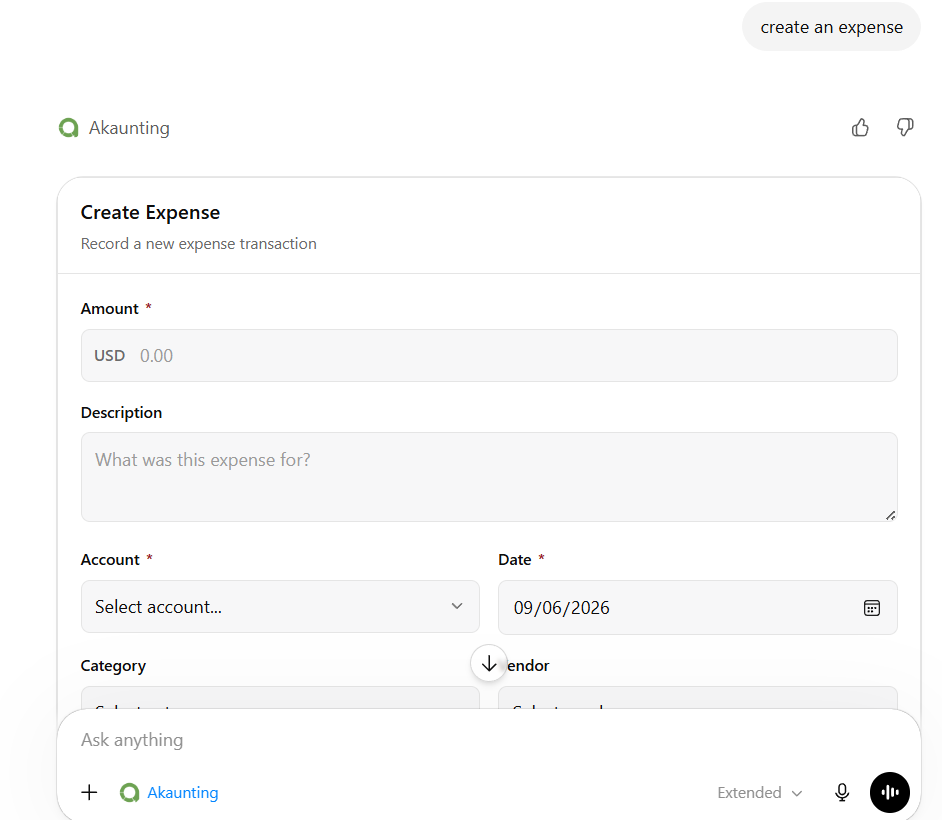
This can help speed up expense tracking, especially when you want to record a transaction quickly without moving through several manual steps.
Here are some recommended reads
- — Keep Vendor Payments Clear With the Vendor Statement App
- — Restaurant Accounting 101: Bookkeeping and Compliance Tips for Food Businesses in 2026
- — Contractor Progress Billing: How to Fix Cash Flow Issues
- — Creator Economy Accounting Problem And the Tools Solving It
- — April 2026 Round Up: Invoicing Growth, User Activity, and Top Akaunting Apps
Frequently Asked Questions
What is the Akaunting May 2026 Round Up?
The Akaunting May 2026 Round Up is a monthly product and user activity update that highlights user growth, popular accounting features, top apps, subscription trends, and useful product tips.
Which Akaunting feature grew the most in May 2026?
Create Category saw the highest feature growth in May, up 119% from April. This suggests that more users are organizing income and expenses with custom categories.
Which countries had the strongest Akaunting user growth in May 2026?
The strongest user growth came from Tanzania, Brazil, Costa Rica, Thailand, and Colombia. Tanzania had the highest month-over-month growth at 220%.
What was the most popular Akaunting app trend in May?
The Print Invoice Template had the largest increase in added-to-cart growth, rising 700%. This suggests a strong interest in invoice customization and professional invoice design.
Can I connect Akaunting to ChatGPT?
Yes. With the Akaunting x ChatGPT app, users can connect Akaunting to ChatGPT to get financial insights, create expenses, and interact with accounting data using simple prompts.
Why are recurring invoices important for small businesses?
Recurring invoices help businesses automate repeat billing, reduce manual work, avoid missed invoices, and improve cash flow consistency.
Why does cash flow matter in small business accounting?
Cash flow shows how money moves in and out of a business. It helps business owners understand liquidity, plan expenses, manage supplier payments, and avoid short-term financial pressure.