

Contractor Progress Billing: How to Fix Cash Flow and Stop Getting Paid Late
Reading Time: 7 minutesWhen you send invoices only when you remember, the client pays only when they remember.
Carrying $40,000 in unpaid costs two months into a job ruins your cash flow. When Friday payroll delays your Monday supplier payments, the problem indicates a broken billing system, and not the work issues.
To avoid this, switch to a progress-billing system, where you bill the client in smaller chunks as parts of the job get done, rather than waiting until the very end (or a month) of a project.
This method protects your business in two ways:
- — Stops money from getting stuck.
- — Spreads the financial risk across payments by tying them directly to completed milestones
Let’s discover how progress billing can help fix the cash flow for your contracting business.
Lock the billing terms before the job starts
Most late payments result from confusing contract terms in which payment dates or job milestones are unclear. A strict billing setup fixes these issues before work even starts on site.
You’re eventually creating a system that turns every future invoice into a simple checklist based on rules you’ve signed.
To set up these clear billing terms:
— Create a schedule of values
It’s a setup that relies on scheduling the values you provide as output, essentially breaking the total contract price into discrete line items. Amount is assigned to each component of the work.
Here’s what it means:
Breaking down the total cost: Separate the contract price into separate line items with specific dollar amounts. When you bill for 30% progress, both parties can see which line items that percentage covers. Many contractors now use an estimate generator to simplify the creation of standardized estimates that align with progress billing workflows.
Clearly define completion criteria: Mention exactly what a completed work looks like across every item. For example, specify whether the item requires a passed inspection or a client sign-off because, without these rules, the client decides what “complete” means.
— Setting up clear payment terms
Payment terms are expressed as enforceable numbers that prevent the slow movement from Net 15 to Net 45 over the course of a project. Add late fees by applying a monthly fee of 1%-1.5% to overdue invoices (a standard), making delays costly for the payer.
Not sure what Net 15 means? Check out this blog post for a breakdown of Net 30 payment terms.
To set this up initially as a part of progress billing:
Use exact calendar dates: mention Net 15 or Net 30 to indicate to the client how many days they have to pay the invoice. Something like “upon receipt” may allow the client to choose their own payment date.
Set retainage deadlines: Limit how long the client can hold back funds by tying the release of funds to a specific trigger, such as the final inspection, so that a percentage of your invoice amount does not remain locked up after you finish the job.
Sending clean invoices in a timely manner
Treating invoices as a month-end task can create a 30-day blind spot, where problems may go unnoticed. Instead, switch to reviewing bills weekly to catch late payments early, while they are still easy to collect.
Start with these:
1. Invoicing on the same day
Accounts payable departments operate on fixed processing cycles, so an invoice that falls within the cycle is paid within it. The invoice sent between cycles waits until the next one. Timing matters especially in online businesses like dropshipping, where delayed payouts and supplier charges can create short-term cash gaps if billing and payment schedules fall out of sync.
To fix this:
- — Match the client’s pay cycle: Accounts payable departments process bills on set schedules. Sending your invoice on fixed dates, like the 1st and 15th of every month, makes sure you get paid within their normal cycle.
- — Remove the memory gap: When you send invoices only when you remember, the client pays only when they remember. Consistent billing dates shorten payment delays without changing your contract.

Oliver Baker, the Managing Director of QuantumXL, says, “I learned that invoices get delayed when billing depends on memory instead of process. At QuantumXL, we send invoices on fixed dates tied to project milestones, and each invoice follows the same structure, includes approval notes, and provides a delivery summary. That consistency eliminates unnecessary back-and-forth, as clients already have the context they need to approve payment. We also invoice as soon as a milestone closes, rather than batching everything at month-end, which keeps cash flow predictable on both sides. Over time, the billing process stops feeling like a collection exercise and starts working as part of the delivery system itself.”
2. Attaching the progress proof routed through the A/P team
Communicate clear progress on the task to the A/P team, including the schedule of values and line items matching the current-cycle completion percentages.
You can back this up in the following ways:
- — Add all backup documents: include job breakdowns, current completion percentages, progress photos, and signed change orders with every progress invoice.
- — Skip the middleman: Email the invoice directly to the client’s billing department and copy the project manager to prevent it from getting stuck on a manager’s desk.
- — Keep the format identical: Billing departments pause invoices that look different from past bills. Using the exact same layout every time makes processing faster.
3. Using Akaunting’s Invoicing software
Akaunting’s invoicing software generates recurring progress invoices that help maintain a consistent schedule of values across billing cycles.
Here’s how it helps:
- — Accounting helps automate paperwork, update your job breakdown across months, and save client email addresses, so layouts never change.
- — Frees you from using manual spreadsheets, which cuts out human error and stops format mistakes from delaying your money.
Watching your receivables weekly, not monthly
Moving to a weekly review is a form of proactive customer service. It lets you catch late payments quickly while they are still easy to collect, rather than waiting until you need professional recovery help.
Weekly cash tracking is essential in several industries where operating costs outpace incoming payments, including construction, freelance work, and print-on-demand businesses.
You can implement the following two habits to maintain clear visibility into your cash each week.
Run an aged receivables report every Friday
An aging report is a tool that sorts your unpaid invoices by elapsed time, placing them into 30-day groups such as current, 31 to 60 days, 61 to 90 days, and over 90 days.
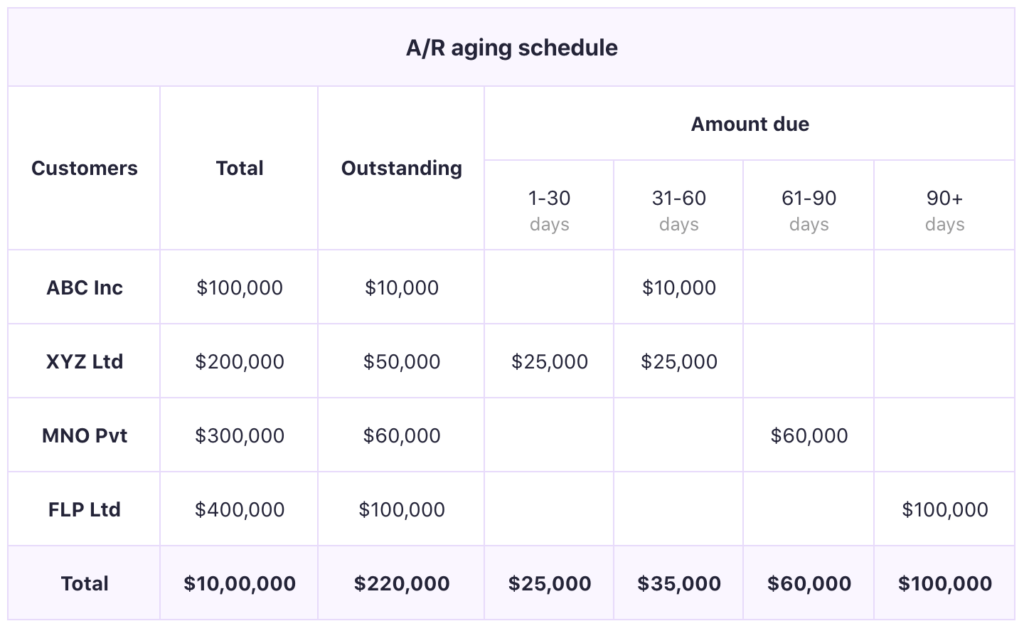
Example of an aging accounts receivable schedule
Looking at the balance across these groups tells you exactly how healthy your collections are. If most of your money sits in the current group, your system is working well. If the older groups keep growing each month, your collection process is failing, even if your sales look strong on paper.
- — 31 to 60 days: Suggests that the invoice is still highly collectible with a simple, polite phone call to the billing department.
- — 61 to 90 days: Requires you to escalate the issue by sending formal demand letters or official lien notices.
- — Over 90 days: This recovery often requires a collection agency or legal action, but the fees for these services also quickly eat up the job profit that progress billing was meant to protect.
Track your Days Sales Outstanding month over month
Days Sales Outstanding measures the average number of days it takes for your company to collect payment after a sale.
Since the average construction collection time ranges from 60 to 90 days, you should focus on your own numbers rather than comparing yourself to other companies.
For instance, if the collection time climbs from 42 days to 51 days, and then to 58 days over three months, your system is slowing down.
Check out this blog post on Days Sales Outstanding to get a better understanding of how to manage your outstanding debts better.
Using the Aged Receivables App
The Aged Receivables app by Akaunting can automate weekly visibility into missed invoices, broken down by client and aging bucket. It eliminates the manual report assembly that usually prevents contractors from consistently running aged receivables.
The Cash Flow Statement app operates alongside it, highlighting inflows and outflows without manual reconciliation.
Chase late payments on a fixed schedule
Late payments do not necessarily indicate a client’s refusal to pay. Invoices get stuck in approval queues, or clients delay payments to manage their own cash flow.
Knowing how money actually moves between businesses separates real late payers from clients waiting on a settlement window.
Move to a more predictable escalation schedule by treating late payments as a routine task rather than a fight.
Here’s the sequence to follow past due date:
Day 7-10: Setting up an automated payment reminder over email can address a large share of late invoices, since most simply require a nudge to surface in the AP queue.
Days 10-15: Email the billing department directly. Re-attach the original invoice and all backup documents to send into their active review pile.
When backup documents arrive as separate files, a reviewer must manually match each to the invoice, and if a single piece is missing or misplaced, the invoice triggers a hold. You can merge PDF files into one package so the documentation is already organized when it reaches the billing department.
Days 16-30: Call the client. Refer to your contract terms and request a specific payment date to secure a verbal commitment.
Days 31 to 44: A written demand letter is sent, and non-critical project work is paused, which moves the issue into a serious contract action.
Day 45+: File a mechanic’s lien. Involve an attorney or a collections agency here, as missing strict state or provincial filing deadlines can kill your claim completely.
Conclusion
You don’t want to leave billing as an optional administrative. Otherwise, it’ll only leave your cash flow vulnerable to constant delays. A move to an automated progress-billing setup can remove the ambiguity from your invoicing and help keep your projects funded by the client.
Managing this system does not require hiring more staff or chasing more sales. It simply requires replacing manual spreadsheet work with consistent, automated tracking that protects your bank balance every week of the month.
Akaunting builds this entire workflow directly into your business. You automatically generate progress invoices, organize weekly aging reports, and track cash flow in real time. It takes the burden of chasing late payments off your team by handling the administrative labor for you.
Author’s Bio:

Rushali Das helps B2B SaaS companies grow organically through performance-led link-building strategies. By earning high-authority backlinks to relevant content assets, she improves search performance, drives qualified traffic, and supports MRR growth.